
CRM Chrome Extension for Telegram: Why It Works
Discover why a Chrome extension CRM for Telegram Web is the most efficient way to manage sales conversations.

Adam Rivera
CRM Chrome Extension for Telegram: Why It Works
A Telegram CRM Chrome extension is a browser add-on that embeds CRM features -- contact tags, notes, follow-up reminders, a deal pipeline, and quick replies -- directly inside Telegram Web, so you manage your entire sales workflow without ever leaving the chat. It works because it removes the tab switching, copy-pasting, and data re-entry that standalone CRMs force on you, and because it layers onto an interface your team already knows.
If you sell through Telegram, you already know the pain of juggling chat windows, spreadsheets, and disconnected CRM dashboards. In this guide, we break down why the Chrome extension approach to CRM is gaining traction among Telegram-based sales teams, how it compares to other methods, and how GramSales turns Telegram Web into a full-featured sales hub. For the bigger picture, see our pillar Telegram CRM guide.
Why a Chrome Extension CRM Beats Standalone Apps
The Context-Switching Problem
Every time you leave Telegram to update a deal in a separate CRM, you lose momentum. Research led by Dr. Gloria Mark at the University of California, Irvine found it takes roughly 23 minutes to fully return to a task after an interruption. For salespeople handling dozens of conversations a day, those interruptions add up to hours of lost focus.
A Telegram CRM Chrome extension eliminates this friction entirely. Your CRM sidebar lives right next to the conversation, so you can tag contacts, add notes, and move deals through your pipeline without ever leaving the chat.
Real-Time Data Where You Need It
Standalone CRMs rely on manual data entry or scheduled syncs. By the time a lead's information appears in your dashboard, the conversation may have moved on. A Chrome extension CRM reads context directly from Telegram Web, giving you real-time access to contact details, chat history, and deal status the moment you open a conversation.
Zero Learning Curve
Your team already knows how to use Telegram. A Chrome extension CRM layers on top of that familiar interface instead of forcing everyone to learn an entirely new tool. That means faster adoption, less training, and quicker return on investment.
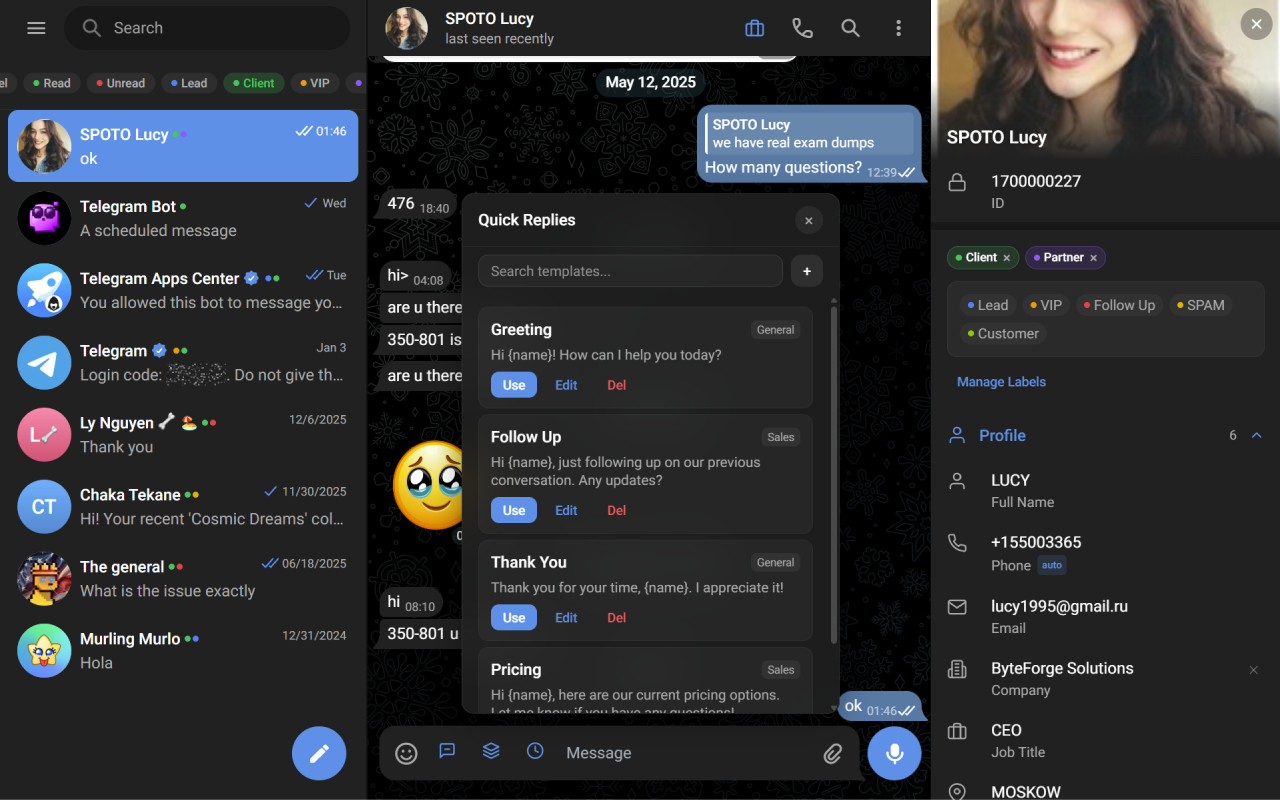
The Chrome extension injects the CRM directly into Telegram Web — nothing new to open.
How GramSales Works as a Telegram CRM Chrome Extension
GramSales is built from the ground up as a CRM sidebar for Telegram Web. Once installed, it adds a persistent panel alongside your chats that gives you access to a complete sales toolkit.
Contact Labels and Color Tags
Assign custom labels and color-coded tags to any Telegram contact. Whether you segment by lead source, deal stage, or priority level, visual tags let you scan your chat list and instantly know who needs attention.
Notes and Reminders
Attach private notes to any contact so your team shares context without cluttering the chat. Set reminders and snooze follow-ups so no lead falls through the cracks. When the reminder fires, it surfaces inside Telegram Web itself -- not in a separate app you might ignore.
Kanban Deal Pipeline
Drag-and-drop deals across customizable stages directly from the sidebar. Every pipeline update is visible to your team in real time, keeping everyone aligned without a single status meeting.
Quick Reply Templates with Variables
Create reusable message templates with dynamic variables like the contact's name or company. Reply to common questions in seconds while still sounding personal. This is especially valuable for teams handling high volumes of inbound inquiries.
AI Smart Replies, Translation, and Summarization
GramSales uses AI to draft context-aware replies, translate messages on the fly, and summarize long conversation threads. When you are managing dozens of active deals, AI assistance keeps response times low and quality high. See AI-powered Telegram sales for a deeper look at how these features shorten your sales cycle.
Dashboard Analytics and CSV Export
Track conversion rates, response times, and pipeline velocity from the built-in dashboard. Export your data to CSV whenever you need to build custom reports or share metrics with stakeholders.
Chrome Extension CRM vs. Other Approaches
Standalone CRM Applications
Tools like HubSpot or Pipedrive are powerful, but they were not designed for Telegram. Integrations exist through third-party connectors, but they often lag behind, miss messages, or require complex setup. A dedicated Telegram CRM Chrome extension is purpose-built for the platform, so every feature works natively.
Bot-Based CRM Solutions
Some teams try to manage contacts and deals through Telegram bots. While bots can handle simple commands, they lack a visual interface. You cannot drag deals across a kanban board, view color-coded tags at a glance, or see analytics dashboards inside a bot. A Chrome extension CRM provides the rich visual layer that bots simply cannot offer.
If you are weighing in-Telegram-Web extensions specifically, our GramSales vs 3RM comparison breaks down how the two purpose-built options differ on features and pricing.
Manual Spreadsheets
Spreadsheets are free, but they scale poorly. Data entry is manual, collaboration is clunky, and there is no integration with your chat platform. A Chrome extension CRM captures data automatically and keeps it synchronized with your conversations.
| Approach | Native Telegram Integration | Visual Pipeline | Real-Time Sync | Setup Complexity |
|---|---|---|---|---|
| Chrome Extension CRM | Yes | Yes | Yes | Low |
| Standalone CRM | Partial (via connectors) | Yes | Delayed | High |
| Bot-Based CRM | Partial | No | Partial | Medium |
| Spreadsheets | No | No | No | Low |
How to Install and Set Up GramSales
Getting started with the GramSales Telegram CRM Chrome extension takes less than five minutes.
Step 1: Install from the Chrome Web Store
Search for "GramSales" in the Chrome Web Store and click "Add to Chrome." The extension requires no special permissions beyond access to Telegram Web.
Step 2: Open Telegram Web
Navigate to web.telegram.org in Chrome. You will see the GramSales sidebar appear automatically on the right side of the screen.
Step 3: Configure Your Pipeline
Set up your deal stages, labels, and quick reply templates from the sidebar settings. GramSales provides sensible defaults, but you can customize everything to match your sales process.
Step 4: Start Tagging and Tracking
Open any conversation and begin adding labels, notes, and deals. The extension saves everything in real time, so your team sees updates instantly.
Pricing That Scales With Your Team
GramSales offers a Free plan at $0 that covers the essentials. The Pro plan starts at $12 per month (billed annually) or $19 month-to-month, adding features like AI smart replies and advanced templates. For larger teams, the Business plan at $25 per month (annual) or $39 monthly includes the full feature set with priority support. See the full breakdown on our pricing page.
Why the Chrome Extension Model Wins for Telegram Sales
The best CRM is the one your team actually uses. By embedding directly inside Telegram Web, a Chrome extension CRM removes every barrier to adoption. There is no new app to install on every device, no login to a separate dashboard, and no risk of data falling out of sync.
GramSales takes this further by combining contact management, pipeline tracking, AI assistance, and analytics into a single sidebar. The result is a CRM that feels like a natural extension of Telegram itself.
Frequently Asked Questions
Is a Telegram CRM Chrome extension safe to use?
A reputable Telegram CRM Chrome extension only requests the permissions it needs to work inside Telegram Web, and it does not read or store your message content for training. GramSales keeps your CRM data in your own workspace and adds a sidebar on top of the official Telegram Web client rather than replacing it. As with any extension, install only from the official Chrome Web Store listing.
Does GramSales work on Edge and Brave, or only Chrome?
GramSales runs on any Chromium-based browser, including Google Chrome, Microsoft Edge, and Brave. Because all three browsers share the Chrome extension framework, you install GramSales from the Chrome Web Store and it works the same across them. It loads alongside Telegram Web, so you can manage contacts and deals wherever you already chat.
Do I need a paid plan to try it?
No. GramSales has a Free plan with no credit card required, so you can install the extension and start tagging contacts, taking notes, and setting reminders right away. Paid Pro and Business plans add AI smart replies, advanced templates, and team features, and every paid plan is backed by a 30-day refund. Compare tiers on the pricing page.
Related Guides
- Telegram CRM: The Complete Guide -- the pillar overview of how a CRM inside Telegram works end to end.
- GramSales vs 3RM -- a side-by-side comparison of the two purpose-built in-Telegram-Web CRM extensions.
- AI-Powered Telegram Sales -- how smart replies, translation, and summarization speed up your pipeline.
Start Selling Smarter on Telegram
If you are ready to stop losing leads in your chat history and start managing your Telegram sales like a professional, a Telegram CRM Chrome extension is the fastest way to get there. Install GramSales from the Chrome Web Store -- it is free to start, with no credit card required -- and see your contacts, notes, reminders, and pipeline appear right inside Telegram Web. Then review the pricing page when you are ready to unlock AI replies and team features. Want more tips? Visit our blog.
About the author
Adam Rivera
Founder & Product Lead, GramSales
Adam has been shipping software since 2009 and leading product and engineering teams since 2012. Over nearly twelve years at GMR Marketing he went from Lead Application Developer to SVP of Digital Product & Experience Technology, where he shipped an omni-channel CRM and POS platform and stood up a data-science practice — building a stack that runs from React and .NET Core through Azure, Databricks and Python. He started GramSales to bring that same CRM thinking to where conversations actually happen: inside Telegram.
Connect on LinkedIn