
How to Use a CRM Inside Telegram: A Complete Guide
What a Telegram CRM is, why Telegram sellers need one, and how GramSales adds contacts, pipeline, and AI replies inside Telegram Web.

Adam Rivera
A Telegram CRM is a customer relationship management tool built specifically for people who sell, support, or manage contacts through Telegram. Instead of forcing you into a separate dashboard, the best Telegram CRMs work where your conversations already happen, so you can label a contact, log a note, move a deal, and schedule a follow-up without ever leaving the chat. This guide explains what a Telegram CRM is, why messaging-first sellers need one, the features that matter, and how GramSales delivers all of it directly inside Telegram Web.
What Is a Telegram CRM?
A Telegram CRM is a system that organizes your Telegram contacts, conversations, and deals into a structured sales workflow. Traditional CRMs like Salesforce or HubSpot were designed around email, web forms, and phone calls. A Telegram CRM is designed around chat, the channel where a growing share of buyers actually prefer to talk.
In practice, a Telegram CRM gives you four things a plain chat app never will:
- A single record per contact — labels, tags, notes, history, and deal status attached to each person you talk to.
- A pipeline view — every active opportunity laid out by stage so nothing stalls silently.
- Repeatable communication — saved templates, scheduled messages, and (increasingly) AI-assisted replies.
- Visibility — a dashboard that answers "how many deals am I working, and which need attention?"
There are two broad approaches. Hosted, multichannel platforms pull Telegram into an external inbox alongside WhatsApp, Instagram, and email. Native, in-Telegram tools — like a Telegram CRM Chrome extension — layer the CRM directly onto Telegram Web itself. Each has trade-offs, which we cover in the alternatives section below.
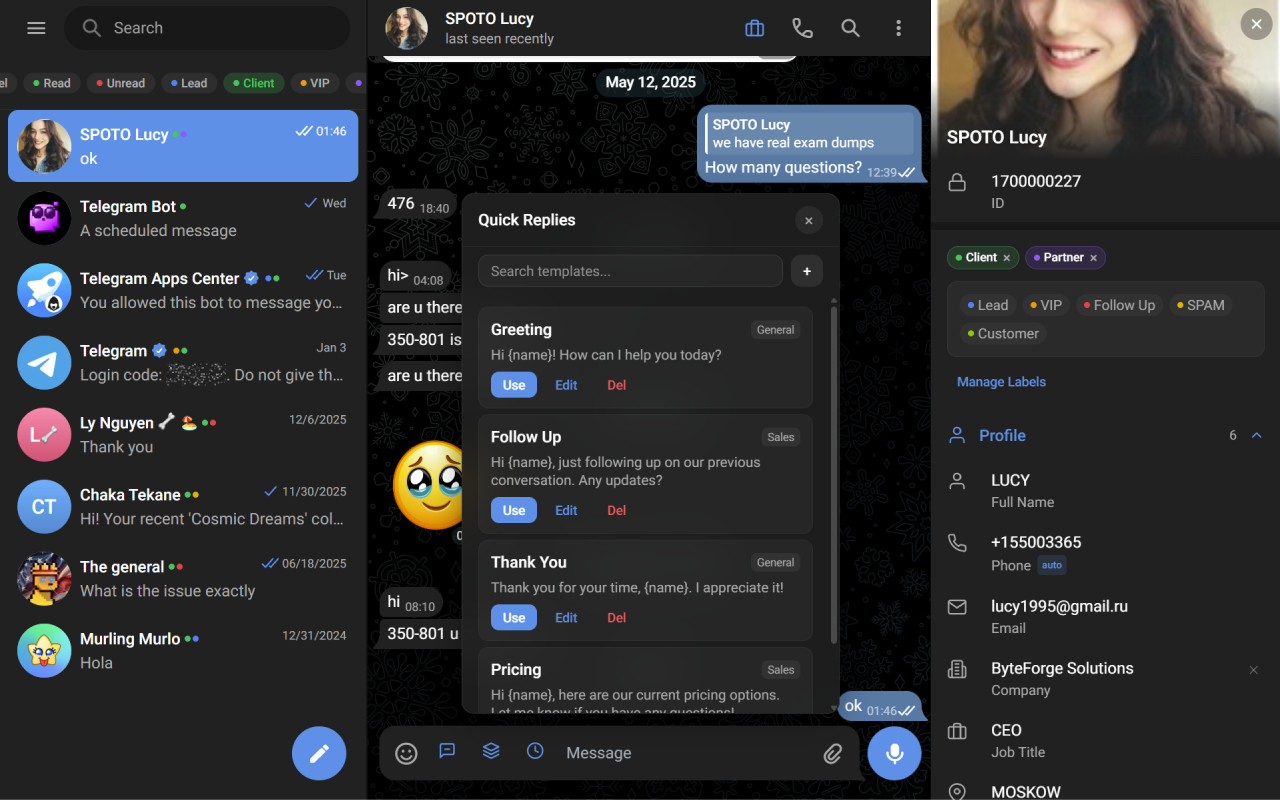
Everything in this guide happens in one place: the GramSales sidebar inside Telegram Web.
Why Do Telegram Sellers Need a CRM?
Telegram sellers need a CRM because Telegram was built for messaging, not for managing a sales process — and at scale, the gap between "having conversations" and "running a pipeline" is where revenue leaks. Telegram has grown into a serious business channel, reportedly surpassing 1 billion monthly active users as of 2025 per Reuters. When that much of your audience lives in one app, the app's native limits become your limits.
Here is what typically goes wrong without a CRM.
The Context-Switching Problem
Every time you leave Telegram to update a spreadsheet, log a note elsewhere, or check a pipeline in a separate tool, you break your focus. Research from Gloria Mark and colleagues at UC Irvine found that once interrupted, people take a meaningful amount of time to return to the original task — and when you are juggling dozens of live chats, those resets compound across the day. Keeping the CRM inside the chat removes the switch entirely.
Lost Follow-Ups
Without reminders tied to your conversations, promising leads slip away. You meant to follow up with that buyer on Friday, but Monday arrives and the message is buried under fifty newer chats. A structured lead follow-up workflow turns "I'll get to it" into a scheduled, unmissable task.
No Visibility Into Your Pipeline
How many deals are you working right now? What is your conversion rate? Which contacts have gone cold? Without a CRM, answering these questions means scrolling chat history and guessing. A visual sales pipeline replaces guesswork with a board you can read in seconds.
Inconsistent Communication
When you type the same answers over and over, quality drifts. One prospect gets a thorough pricing breakdown; another gets a rushed two-line reply because you were slammed. Saved quick-reply templates keep every response complete and on-brand.
Core Features of a Telegram CRM
The core features of a Telegram CRM are contact organization, a deal pipeline, follow-up reminders, reusable templates, and — increasingly — AI assistance for replies and translation. Use this checklist when comparing tools.
| Capability | What it does | Why it matters for selling |
|---|---|---|
| Contact labels & color tags | Categorize contacts (hot lead, customer, VIP) | Triage at a glance, right in your chat list |
| Notes | Attach budget, preferences, and history to a contact | Context survives even after months of silence |
| Follow-up reminders | Schedule a nudge tied to a conversation | No promising lead goes cold |
| Deal pipeline (kanban) | Track opportunities by stage | See what is stalling and where to push |
| Quick-reply templates | Saved messages with variables like {name} | Fast, consistent, personalized replies |
| Scheduled messages | Queue messages to send later | Reach contacts at the right time, even offline |
| AI smart replies | Suggested responses from chat context | Draft faster; reduce blank-page friction |
| Translation & summarization | Translate or condense threads | Sell across languages; catch up on long chats |
| Dashboard | Metrics on deals, activity, and progress | Make decisions from data, not memory |
| Multi-account & team roles | Switch accounts; share data with roles | Scale from solo seller to a coordinated team |
If you want a side-by-side look at how different products implement these, see our roundup of the best CRM tools for Telegram.
How GramSales Works as a Telegram CRM
GramSales works by living inside Telegram Web as a Chrome extension, so the entire CRM appears as a sidebar next to your conversations instead of in a separate app. Open Telegram Web, and the GramSales panel is right there. The model is simple: like WAPlus for WhatsApp, but purpose-built for Telegram. Here is what that gives you.
Contacts, Labels, and Color Tags
Organize contacts with custom labels and color-coded tags that surface directly in your chat list. At a glance you can tell a hot lead from a returning customer from a VIP — no clicking required. This is the foundation of solid Telegram contact management.
Notes and Follow-Up Reminders
Attach notes to any conversation to capture budget, preferences, or past purchases, then set a reminder to follow up at the right moment. GramSales notifies you so the opportunity never slips.
Kanban Deal Pipeline
Track every deal from first contact to closed-won on a visual kanban board. Drag deals between stages, set values, and read your whole sales pipeline without leaving Telegram. You can also group deals under companies and attach tasks for a fuller picture of each account.
Quick-Reply Templates With Variables
Build reusable templates for pricing, FAQs, and onboarding, with variables that auto-personalize each message using the contact's name or other details. Send a complete, professional reply in seconds rather than retyping it for the hundredth time.
Scheduled Messages
Queue messages to send at the optimal time, even when you are away from your desk — useful for time-zone-spread audiences and consistent follow-up cadences.
AI Smart Replies, Translation, and Summarization
GramSales includes AI features that help you respond faster and smarter: context-aware suggested replies, on-the-fly translation for international clients, and thread summarization to catch up on a long conversation quickly. For a deeper look at the workflow, read AI-powered Telegram sales.
Dashboard, Tasks, and Companies
A built-in dashboard shows your activity and deal progress at a glance, while tasks and a companies layer keep larger accounts organized. Use the trends to spot bottlenecks and decide where to focus.
Multi-Account and Team Workspaces
Manage more than one Telegram account — for different brands or teams — and switch between them smoothly. When you are ready to grow beyond solo selling, shared team workspaces with roles let everyone work from the same contacts, pipeline, and notes.
How to Set Up GramSales: Step by Step
Setting up your Telegram CRM with GramSales takes just a few minutes.
- Install the Chrome extension. Add GramSales from the Chrome Web Store. It works in any Chromium-based browser, including Google Chrome, Microsoft Edge, and Brave.
- Open Telegram Web. Navigate to Telegram Web; GramSales detects the page and injects the CRM sidebar automatically.
- Sign in and pick a plan. Create your free account — no credit card required — and you are ready to organize.
- Tag your existing contacts. Add labels and color codes, and drop in notes capturing what you already know about each person.
- Build your pipeline. Create stages that match your sales process, then add active deals to the right stage.
- Create quick-reply templates. Write your most common messages and add variables like the contact's name to keep them personal.
- Turn on AI and reminders. Enable smart replies and translation, and set follow-up reminders so nothing falls through the cracks.
Who Is a Telegram CRM For?
A Telegram CRM is for anyone whose business conversations happen in Telegram and who needs those conversations to turn into tracked, repeatable results. That includes:
- E-commerce sellers taking orders and answering inquiries in chat — see Telegram CRM for e-commerce.
- Crypto and Web3 teams running community-driven deal flow — see Telegram CRM for crypto.
- Agencies coordinating clients and teammates across accounts — see Telegram CRM for agencies.
- Freelancers and consultants managing client relationships and project threads.
- Community managers tracking key members, partners, and sponsors.
- Recruiters and real estate agents maintaining candidate or buyer pipelines through chat.
If you are just getting started, our guide on how to sell on Telegram pairs well with this one.
GramSales Pricing
GramSales offers a free plan so you can start with no commitment and no credit card, plus two paid tiers that unlock more power as you grow.
| Plan | Annual (per month) | Monthly | Best for |
|---|---|---|---|
| Free | $0 | $0 | Solo sellers getting organized |
| Pro | $12 | $19 | Active sellers using AI replies and full pipeline |
| Business | $25 | $39 | Teams needing workspaces, roles, and priority support |
Every paid plan is backed by a 30-day refund policy. See the full breakdown on the pricing page.
Telegram CRM Alternatives: How GramSales Compares
The Telegram CRM market splits into native in-Telegram extensions and hosted multichannel platforms, and the right choice depends on whether you want to stay inside Telegram Web or run an external inbox. Below is a fair, high-level comparison; figures are as of 2026, per each vendor's own site or listing, and should be re-verified before you buy.
| Approach | Examples | Strengths | Trade-offs |
|---|---|---|---|
| In-Telegram extension | GramSales, 3RM | Zero context switching; fast setup; works in Telegram Web | Focused on Telegram rather than every channel |
| Messenger CRM (multichannel) | Kommo | Unifies WhatsApp, Instagram, Telegram, and more | Heavier setup; per-seat pricing; Telegram is one of many channels |
| Telegram-native SaaS | CRMChat, Entergram | Deep Telegram automation and outreach | Separate dashboard to live in |
A few honest notes:
- Kommo is an established messenger-based CRM (formerly amoCRM) with strong multichannel reach. As of 2026, per its site, plans start around $15 per user/month with a minimum commitment, so it suits teams that want one inbox for many channels rather than a Telegram-first tool. See GramSales vs Kommo.
- 3RM is the closest direct comparison: another Chrome extension that adds a CRM inside Telegram Web, with a free core tier and a Web3 lean, per its listing as of 2026. See GramSales vs 3RM.
- CRMChat and Entergram are Telegram-native SaaS platforms with heavy outreach and use-case content; they are powerful but run in their own dashboards rather than inside Telegram Web.
GramSales's wedge is simple: a full CRM — contacts, pipeline, templates, scheduling, AI, and team workspaces — that lives where you already work, with a free plan to start.
Frequently Asked Questions
What is a Telegram CRM?
A Telegram CRM is a customer relationship management tool built for selling and support through Telegram. It adds contact organization, a deal pipeline, follow-up reminders, templates, and often AI assistance to your Telegram workflow. GramSales delivers all of this as a sidebar inside Telegram Web.
Is there a free Telegram CRM?
Yes. GramSales has a Free plan with no credit card required, covering core contact management, labels, notes, and reminders. You can upgrade to Pro or Business later for AI smart replies, a full pipeline, and team workspaces.
Does GramSales work with my browser?
GramSales runs as an extension in any Chromium-based browser, including Google Chrome, Microsoft Edge, and Brave. Install it, open Telegram Web, and the CRM sidebar appears automatically.
Is my Telegram data safe with a CRM extension?
GramSales layers its CRM on top of Telegram Web rather than replacing it, and your CRM records (labels, notes, deals) are stored in your GramSales workspace. Every paid plan is also backed by a 30-day refund policy, so you can try it with confidence.
How is GramSales different from Kommo or other multichannel CRMs?
Multichannel CRMs like Kommo pull Telegram into an external inbox alongside other channels, which adds power but also a separate dashboard and per-seat pricing. GramSales is purpose-built for Telegram and lives inside Telegram Web, so there is no context switching. See the best CRM tools for Telegram for a fuller comparison.
Can my whole team use GramSales together?
Yes. The Business plan adds shared team workspaces with roles, so your team works from the same contacts, pipeline, and notes. GramSales also supports multiple Telegram accounts for managing different brands or inboxes.
Start Using Your Telegram CRM Today
Running your business on Telegram without a CRM means working harder than you need to — leads get lost, follow-ups get missed, and you never quite know where your deals stand. GramSales fixes that by putting a complete CRM directly inside Telegram Web, with no tab switching and no copy-pasting.
Install GramSales free from the Chrome Web Store, open Telegram Web, and start selling smarter today. Compare every tier on the pricing page, bookmark this complete Telegram CRM guide for reference, or keep reading the GramSales blog for more Telegram sales strategies.
About the author
Adam Rivera
Founder & Product Lead, GramSales
Adam has been shipping software since 2009 and leading product and engineering teams since 2012. Over nearly twelve years at GMR Marketing he went from Lead Application Developer to SVP of Digital Product & Experience Technology, where he shipped an omni-channel CRM and POS platform and stood up a data-science practice — building a stack that runs from React and .NET Core through Azure, Databricks and Python. He started GramSales to bring that same CRM thinking to where conversations actually happen: inside Telegram.
Connect on LinkedIn