
Telegram CRM for E-commerce Sellers: Turn Chats into Orders
Selling on Telegram? A Telegram CRM organizes buyers, automates replies and follow-ups, and tracks every order from chat to close.

Adam Rivera
Why E-commerce Sellers Need a Telegram CRM
A Telegram CRM gives e-commerce sellers a single place to organize buyers, send fast and consistent replies, and track every order from the first message to a confirmed sale -- all without leaving Telegram Web. If you take orders in DMs, answer "how much?" and "do you ship to my country?" all day, and try to remember who still owes you payment, you already feel the gap that a CRM closes.
Telegram has grown into one of the most popular platforms for business, with over 950 million monthly active users as of 2026 according to Telegram. That makes it a serious storefront -- but Telegram itself was built for messaging, not for selling. There is no buyer database, no order pipeline, and no follow-up system. Every order lives in a chat thread, and when conversations pile up, orders fall through the cracks.
Here is what typically breaks when you run a Telegram shop without a CRM:
- Buyers blur together. You cannot tell a first-time visitor from a wholesale account at a glance.
- You retype the same answers. Pricing, sizes, shipping, and payment details get typed out dozens of times a day.
- Carts get abandoned. A buyer says "let me think" and you never circle back, because there is no reminder.
- Orders have no status. You lose track of who paid, who is waiting on shipping, and who needs a nudge.
- You have no numbers. How many orders this week? What is your average order value? Without a dashboard, you are guessing.
GramSales is built to fix exactly this. It is an AI-powered CRM that lives inside Telegram Web as a Chrome extension, so your buyer database, templates, and order pipeline sit right next to your chats. Think of it as "like WAPlus for WhatsApp, but purpose-built for Telegram." For the full picture of how a Telegram CRM works, start with our complete Telegram CRM guide.
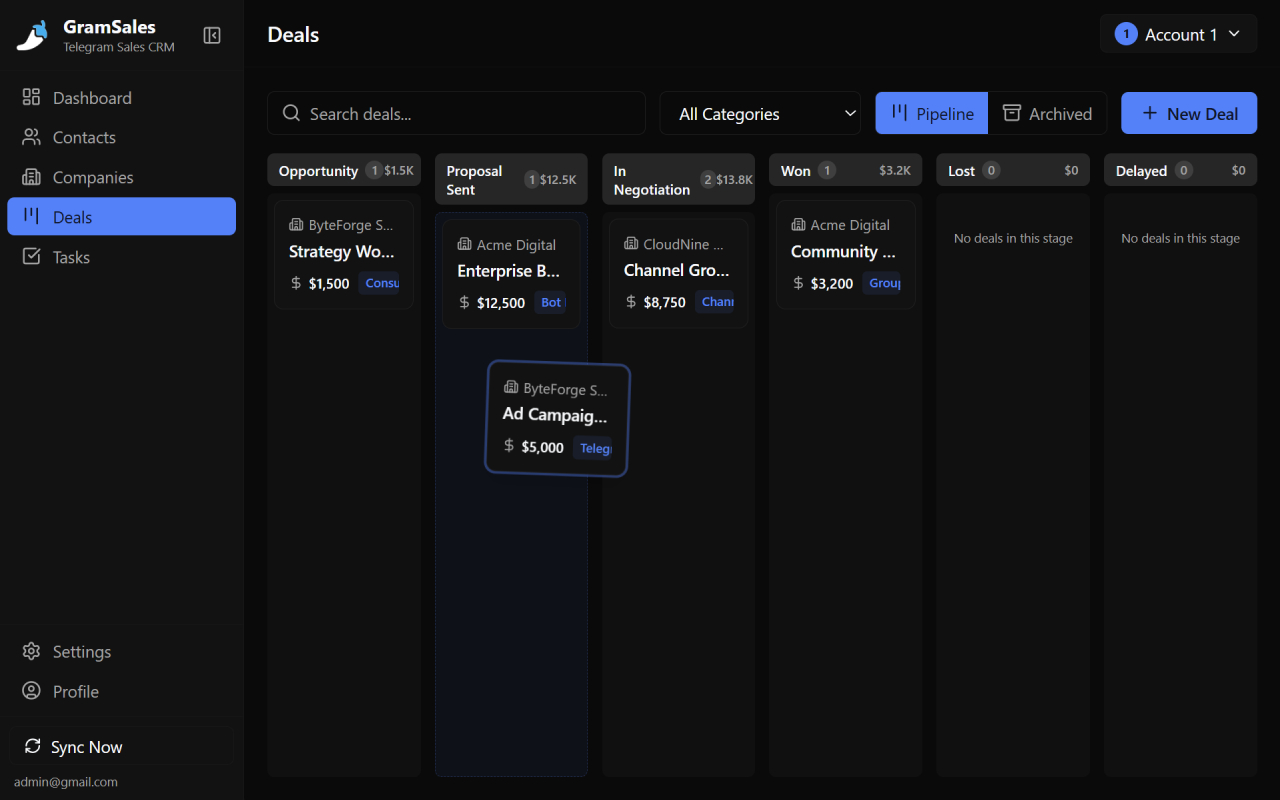
Turn product questions into orders by moving each chat through a simple pipeline.
Organize Buyers With Labels and Color Tags
Labels turn a messy chat list into a sortable buyer database, so you instantly know who you are talking to before you type a word. In GramSales, you add color-coded labels to any Telegram contact, and those tags show up directly in your chat list -- no clicking into a profile to remember who someone is.
For an e-commerce shop, a simple labeling system pays off immediately. A few label sets that work well:
| Label | What it means | How you use it |
|---|---|---|
| New buyer | First-time inquiry, no purchase yet | Send your welcome + catalog template |
| Repeat | Has ordered before | Offer loyalty perks and restock alerts |
| Wholesale | Buys in bulk for resale | Apply tiered pricing, longer payment terms |
| VIP | High-value or high-frequency | Prioritize replies, early access to drops |
| Awaiting payment | Order placed, not paid | Set a follow-up reminder |
| Shipped | Order on the way | Track for delivery confirmation |
With labels in place, you can scan your inbox and instantly prioritize. A VIP message gets answered first. A wholesale buyer gets the bulk price list. A new buyer gets your onboarding flow. You can also attach notes to any contact to record what they bought last time, their size, their address, or their preferred payment method -- so you never ask twice. For a deeper look at structuring your contacts, see our guide to Telegram contact management.
Answer Faster With Quick-Reply Templates
Quick-reply templates let you send your most common answers -- catalog, pricing, shipping, payment -- in one click, with the buyer's name filled in automatically. Instead of retyping "Hi {name}, here's our catalog and current prices" fifty times a day, you save it once and reuse it forever.
GramSales templates support variables, so each message still feels personal. A template like:
Hi {name}! Thanks for your interest. Our {product} is currently {price}, and we ship to your area within {days} business days. Want me to reserve one for you?
...gets personalized on send, but takes a second instead of a minute. The templates that earn their keep in an e-commerce shop:
- Catalog drop -- your product list or a link to your channel, sent the moment someone asks "what do you have?"
- Price quote -- a clean, consistent pricing breakdown so no buyer gets a rushed two-line reply.
- Shipping and delivery -- rates, timelines, and which couriers you use, by region.
- Payment instructions -- your accepted methods and account details, every time the same way.
- Order confirmation -- a tidy recap of what was ordered, the total, and next steps.
- Out of stock / restock -- a polite hold message with an offer to notify when it is back.
Consistency is the hidden benefit here. When every buyer gets the same accurate pricing and shipping info, you make fewer mistakes and look more professional. For a full library of templates you can adapt, read our post on Telegram quick-reply templates.
Schedule Messages for Drops, Promos, and Reminders
Scheduled messages let you queue announcements and follow-ups to send at the perfect time, even when you are asleep or busy packing orders. Instead of remembering to post "restock is live" at 9 a.m., you write it the night before and GramSales sends it on schedule.
E-commerce sellers use scheduling to:
- Announce a drop at the exact moment stock goes live, so eager buyers see it first.
- Send a payment reminder a few hours after an order is placed, without hovering over the chat.
- Time a promo for when your audience is most active, not just when you happen to be online.
- Follow up on a quote the next morning if a buyer went quiet overnight.
Scheduling keeps your shop responsive around the clock without chaining you to your keyboard.
Recover Abandoned Carts With Follow-Up Reminders
Follow-up reminders are the single highest-ROI feature for an e-commerce seller, because most "lost" sales are not lost -- they are just forgotten. A buyer says "let me check with my partner" or "I'll order on payday," and without a reminder, that warm lead goes cold.
GramSales lets you set a reminder on any conversation and notifies you when it is due. The abandoned-cart playbook looks like this:
- Buyer hesitates. They ask the price, then go quiet. You set a reminder for tomorrow and label them "Awaiting payment."
- Reminder fires. GramSales pings you. You open the chat and send a friendly, no-pressure nudge: "Hi {name}, still want me to hold that {product} for you?"
- You close or move on. Either the buyer converts, or you mark it and free up your attention.
This simple loop recovers orders that would otherwise vanish. Following up matters: research from Harvard Business Review found that companies responding to leads within an hour are far more likely to qualify them than those who wait. For a complete system, see our guide to Telegram lead follow-up.
Track Every Order in a Visual Pipeline
A deal pipeline turns your scattered order chats into a visual board where you can see exactly which orders are in progress, paid, or shipped. GramSales gives you a Kanban-style pipeline -- drag each order between stages and never wonder again who still owes you money.
A practical e-commerce pipeline might use these stages:
| Stage | What it captures |
|---|---|
| Inquiry | Buyer asked about a product |
| Quoted | You sent price and shipping |
| Awaiting payment | Order confirmed, payment pending |
| Paid | Money received, ready to fulfill |
| Shipped | Order dispatched, tracking sent |
| Delivered / Closed | Order complete |
Each card can hold the order value, so your board doubles as a real-time view of revenue in motion. You drag a chat from "Quoted" to "Awaiting payment" the moment a buyer says yes, and from "Paid" to "Shipped" when you drop it at the courier. At any second, you know how much money is sitting in your pipeline and which orders need action. To design a pipeline that fits your shop, read our guide to building a Telegram sales pipeline.
See Your Whole Shop on One Dashboard
A dashboard gives you the numbers that gut feeling cannot -- orders this week, revenue in your pipeline, and response times -- so you can spot what is working and what is leaking. GramSales surfaces these metrics from your contacts and deals automatically, so you do not have to maintain a spreadsheet on the side.
With a dashboard you can answer questions that used to be guesswork:
- How many orders did I close this week versus last?
- How much revenue is stuck in "Awaiting payment" right now?
- Which label group -- wholesale, VIP, repeat -- drives the most sales?
- Am I replying fast enough to keep buyers warm?
When you can see the leaks, you can fix them. If "Quoted" deals pile up and never reach "Paid," your follow-up game needs work. If wholesale buyers drive most of your revenue, you know where to focus.
GramSales vs. the Alternatives for Telegram Sellers
The honest comparison below shows where an in-Telegram CRM fits versus the other ways e-commerce sellers try to stay organized. Each approach has trade-offs.
| Approach | Works inside Telegram | Order pipeline | Follow-up reminders | Setup effort |
|---|---|---|---|---|
| GramSales | Yes, native sidebar | Yes, visual Kanban | Yes, per-chat | Minimal |
| Spreadsheet | No, separate tab | Manual columns | None | Low, but manual forever |
| Bot-based CRM | Partial, bot commands | Varies | Varies | Medium-High, technical |
| External CRM + Telegram connector | No, separate dashboard | Yes | Yes | High, per-seat cost |
Hosted Telegram CRMs such as Entergram and CRMChat are capable platforms, and Entergram even publishes a dedicated e-commerce use-case page (as of 2026, per their site). The trade-off is that they pull your work into a separate dashboard or multi-account inbox. GramSales takes the opposite bet: it keeps you inside Telegram Web where your buyers already are. If you want a broader survey of options, our roundup of the best CRM tools for Telegram lays out each model fairly.
A Day in the Life: From Chat to Order
To see how the pieces fit, here is a typical morning running an e-commerce shop with GramSales:
- You open Telegram Web and the CRM sidebar loads next to your chats.
- A new DM asks about a product. You label them New buyer and fire your catalog template -- name auto-filled.
- They like the price. You send your payment instructions template and drag their card to Awaiting payment.
- They go quiet. You set a reminder for tomorrow morning and add a note: "wants the blue one, size M."
- Overnight, a scheduled message announces your restock to your channel.
- The reminder fires the next day. A quick nudge, the buyer pays, and you drag the card to Paid, then Shipped.
- At the end of the week, your dashboard shows orders closed and revenue in flight.
No spreadsheet, no second app, no lost orders. For more on the fundamentals of selling in DMs, channels, and groups, read how to sell on Telegram.
Frequently Asked Questions
Do I need a Telegram bot to use GramSales?
No. GramSales works with your personal or business Telegram account through Telegram Web -- there is no bot for buyers to talk to. Your customers message a real person, not an automated handle, which keeps the experience personal. GramSales simply adds a CRM sidebar on your side of the conversation.
Can I manage more than one shop or Telegram account?
Yes. GramSales supports multiple Telegram accounts, so if you run separate brands, regions, or stores, you can switch between them without losing your labels, notes, or pipelines. Higher plans also add team workspaces with roles, which helps when you have staff handling orders.
Will GramSales work in my browser?
GramSales runs as an extension on any Chromium-based browser, including Google Chrome, Microsoft Edge, and Brave. You install it from the Chrome Web Store, open Telegram Web, and the sidebar appears automatically.
How much does it cost to start?
GramSales has a free plan with no credit card required, so you can organize buyers and try the core features at no cost. Paid plans -- Pro at $12/month billed annually ($19 monthly) and Business at $25/month billed annually ($39 monthly) -- unlock AI replies, the full pipeline, and team features. There is a 30-day refund window. See full details on the pricing page.
Can GramSales help me reply in other languages?
Yes. GramSales includes AI features that translate messages and suggest smart replies, which is handy when you sell to international buyers. You can read a message in your language, reply in theirs, and keep the conversation moving without switching to a separate translation tool.
Turn Your Telegram Chats Into Orders
If Telegram is where your shop runs, your buyer list, templates, and order pipeline should live there too. GramSales gives you labels to organize buyers, quick replies to answer in one click, scheduled messages for drops and promos, reminders to recover abandoned carts, a visual pipeline to track every order, and a dashboard to see it all -- without ever leaving Telegram Web.
Start free with no credit card. Install GramSales from the Chrome Web Store, open Telegram, and turn your next chat into a confirmed order. Compare plans anytime on the pricing page.
About the author
Adam Rivera
Founder & Product Lead, GramSales
Adam has been shipping software since 2009 and leading product and engineering teams since 2012. Over nearly twelve years at GMR Marketing he went from Lead Application Developer to SVP of Digital Product & Experience Technology, where he shipped an omni-channel CRM and POS platform and stood up a data-science practice — building a stack that runs from React and .NET Core through Azure, Databricks and Python. He started GramSales to bring that same CRM thinking to where conversations actually happen: inside Telegram.
Connect on LinkedIn