
How to Follow Up with Leads on Telegram (Without Being Annoying)
Master the art of following up with leads on Telegram. Learn timing, messaging strategies, and how reminders help you close more deals.

Adam Rivera
How to Follow Up with Leads on Telegram (Without Being Annoying)
To follow up with leads on Telegram without being annoying, space your touchpoints out (24 to 48 hours for the first, then every few days to weekly), add a new piece of value with each message instead of repeating your pitch, and use reminders so no lead falls through the cracks. The goal is to stay present and helpful, not to pressure someone into replying. Done poorly, Telegram follow up feels like spam; done well, it feels like attentive service.
Most sales are not won on the first message. Many salespeople on Telegram send one or two messages, get no reply, and move on -- but those leads are rarely lost. They are simply unfollowed. This guide covers the timing, tone, and tools that help you follow up effectively, and how Telegram reminders through GramSales make the process automatic. For the bigger picture on running a sales process inside Telegram, see our complete Telegram CRM guide.
Why Follow-Ups Matter More Than First Impressions
The Numbers Behind Persistence
Persistence is a measurable advantage, and most sellers give up too soon. HubSpot's sales research notes that many deals require multiple follow-up attempts, yet a large share of reps stop reaching out after one or two tries. In practice, the rep who sends a thoughtful third or fourth message is often the only one still in the conversation when the buyer is finally ready to move.
On Telegram, where conversations move fast and messages pile up, a lead who does not reply is not necessarily uninterested. They may be busy, distracted, or simply waiting for the right moment. A well-timed Telegram follow up keeps you visible without creating pressure.
The Cost of Forgetting
Without a system, follow-ups depend on memory. And memory fails. A lead you spoke with on Monday easily slips your mind by Thursday, especially when you are handling 30 or 40 active conversations. By the time you remember, the window has closed and the prospect has moved on to a competitor who stayed in touch.
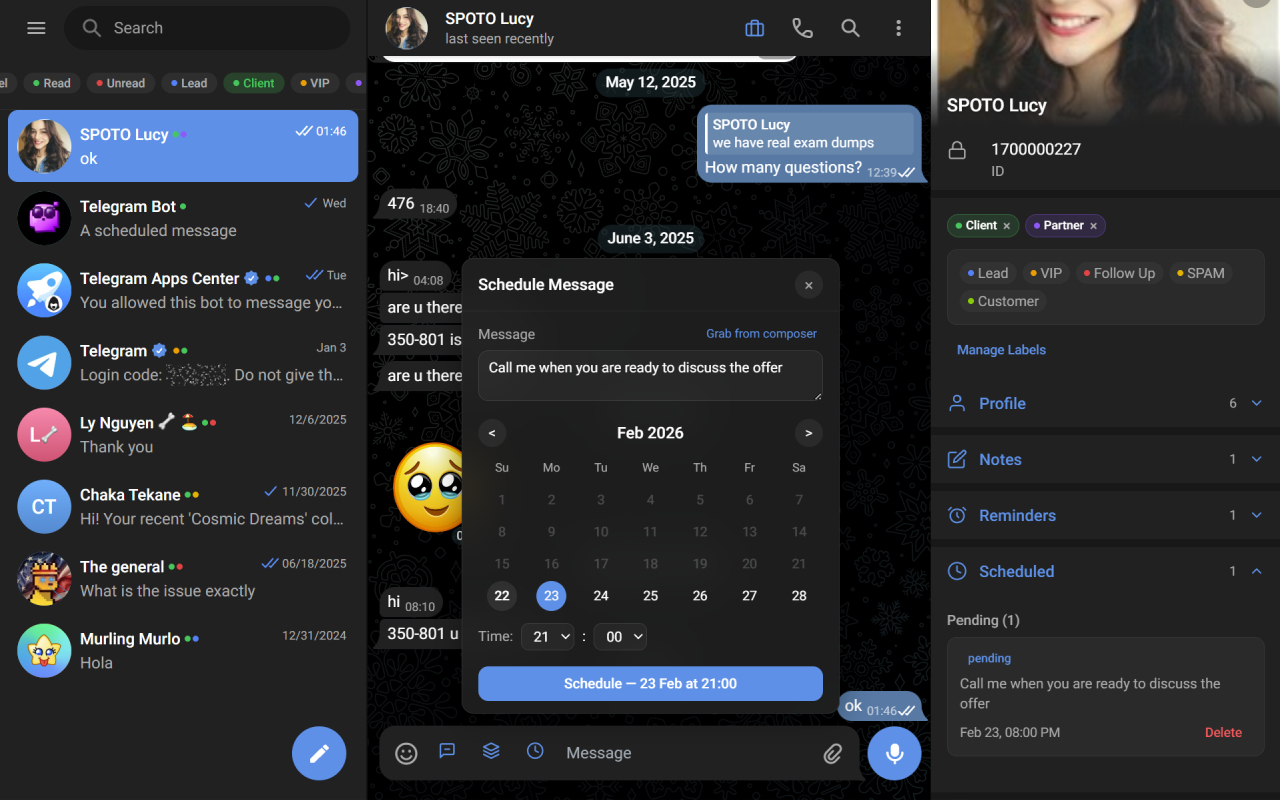
Set a follow-up reminder on any chat and get a browser notification at the right time.
Common Follow-Up Mistakes on Telegram
Sending the Same Message Twice
Copying and pasting your original pitch as a follow-up signals that you did not put any thought into the conversation. The lead sees it as lazy at best, automated spam at worst.
Following Up Too Quickly
Sending a follow-up 30 minutes after your first message comes across as desperate. Unless the conversation is time-sensitive, give leads space to process and respond on their own terms.
Writing Long Follow-Up Messages
A follow-up is not a second pitch. If your follow-up message is longer than your original outreach, you are overloading the prospect. Keep it concise and focused on one clear ask or value point.
Guilt-Tripping the Lead
Messages like "I noticed you have not replied" or "Just checking if you saw my message" put the lead on the defensive. They know they have not replied. Pointing it out does not help.
Optimal Timing and Frequency for Telegram Follow-Ups
The First Follow-Up: 24 to 48 Hours
Wait at least a full day before your first Telegram follow up. This gives the lead time to see your message, consider their response, and reply naturally. If they have not responded after 48 hours, it is time to reach out again.
The Second Follow-Up: 3 to 5 Days Later
Add value with each follow-up. Share a relevant resource, ask a different question, or reference something timely. The goal is to give the lead a new reason to engage, not to repeat your original ask.
The Third Follow-Up: 7 to 10 Days Later
At this point, shift your approach. Instead of pushing for a reply, offer something low-commitment -- a quick demo, a free resource, or an invitation to a community group. Lower the barrier to engagement.
Ongoing Follow-Ups: Every 2 to 4 Weeks
For leads that remain unresponsive, move to a longer cadence. A monthly check-in with a brief, relevant message keeps you on their radar without crossing into annoyance. Some of your best deals will come from leads who respond months after the first contact.
Follow-Up Cadence at a Glance
Use this as a default rhythm and adjust based on how warm the lead is and how time-sensitive the deal is.
| Touchpoint | Suggested timing | Goal | Tone |
|---|---|---|---|
| First follow-up | 24 to 48 hours after first message | Re-surface, give space to reply | Light, helpful |
| Second follow-up | 3 to 5 days later | Add new value or ask a fresh question | Curious, useful |
| Third follow-up | 7 to 10 days later | Lower the barrier (demo, free resource) | Low-pressure |
| Ongoing nurture | Every 2 to 4 weeks | Stay top of mind | Brief, no-strings |
Setting follow-up reminders for each contact is what turns this table from a nice idea into a habit you actually keep.
Follow-Up Message Templates for Telegram
Template 1: The Value-Add Follow-Up
"Hi [Name], I came across [resource/article/case study] that is relevant to what we discussed. Thought you might find it useful: [link]. Happy to chat more whenever it makes sense for you."
Template 2: The Question-Based Follow-Up
"Hi [Name], quick question -- are you still looking to [solve specific problem]? I had a few ideas that might help, but did not want to assume. Let me know if the timing works."
Template 3: The Social Proof Follow-Up
"Hi [Name], just wrapped up a project with [similar client/industry] and the results were strong. Would love to share what worked in case it applies to your situation."
Template 4: The Soft Close Follow-Up
"Hi [Name], I want to be respectful of your time. If [product/service] is not a priority right now, no worries at all. If it is, I am here whenever you are ready to pick things up."
Template 5: The Long-Term Nurture Follow-Up
"Hi [Name], hope things are going well. Just wanted to share a quick update -- [new feature/offer/insight]. No pressure, just keeping you in the loop."
These templates work even better when personalized with details from your previous conversation. With GramSales, you can save these as quick reply templates with dynamic variables, so each message inserts the lead's name and other details automatically.
How GramSales Reminders Automate Your Telegram Follow-Up
Remembering when to follow up with every lead is impossible at scale. Telegram reminders through GramSales solve this by letting you set follow-up dates directly inside Telegram Web.
Setting Reminders
When you finish a conversation and know you need to circle back, open the GramSales sidebar and set a reminder for that contact. Choose a specific date and time, and the reminder will surface inside Telegram Web when it is due.
Snooze for Flexible Timing
Sometimes a lead says "reach out next month." With the snooze feature, you can push the reminder forward without recalculating dates manually. Snooze a contact for a day, a week, or a custom period, and GramSales handles the rest.
Reminder Notifications Inside Telegram Web
Unlike external CRM reminders that pop up in a different app, GramSales notifications appear within Telegram Web itself. You see the reminder, open the conversation, and send your follow-up message -- all in one fluid motion with zero context switching.
Pairing Reminders with Notes
Before you set a reminder, add a note to the contact's profile. Record what you discussed, what the lead's objections were, and what you plan to say next. When the reminder fires, your notes give you instant context so your follow-up feels personal, not generic.
Tracking Follow-Up Effectiveness
Sending follow-ups is only half the equation. You also need to know what is working. The GramSales dashboard tracks key metrics that help you refine your approach:
- Response rates by follow-up sequence position (first, second, third attempt)
- Time to response so you can identify which timing patterns work best
- Pipeline conversion from initial contact through deal stages
- Team performance if multiple reps handle Telegram conversations
Use these insights to adjust your timing, rewrite underperforming templates, and double down on strategies that generate replies. Export your data to CSV anytime you need to run deeper analysis.
Building a Follow-Up System That Scales
The difference between a salesperson who closes consistently and one who struggles is rarely talent -- it is process. A reliable Telegram follow up system ensures that every lead gets the right number of touches at the right intervals, regardless of how busy your week gets.
Here is a simple framework to implement today:
- After every new conversation, add a label and note in GramSales.
- Set a reminder for the first follow-up at the 24 to 48 hour mark.
- Use a quick reply template personalized with the lead's details.
- If no reply, set the next reminder and adjust your angle.
- Review your dashboard weekly to identify patterns and improve.
Frequently Asked Questions
How many times should you follow up with a Telegram lead?
Plan for at least four to six touchpoints over several weeks before moving a lead to a long-term nurture cadence. Most sellers stop after one or two attempts, so simply continuing -- politely and with new value each time -- puts you ahead of the competition. Stop sooner only if the lead explicitly asks you to.
What is the best time to send a follow-up on Telegram?
Wait 24 to 48 hours after your first message before the initial follow-up, then space subsequent messages 3 to 10 days apart. Send during the lead's working hours in their time zone when possible, and avoid following up within minutes of your first message, which reads as desperate.
How do I stop forgetting to follow up with leads?
Use reminders tied to each contact instead of relying on memory. With GramSales you set a follow-up date directly in the Telegram sidebar, and the reminder surfaces inside Telegram Web when it is due -- so you act on it without switching apps. Pairing each reminder with a note keeps your message personal and in context.
Are follow-up message templates considered spam?
No, as long as you personalize them. A saved template becomes spam only when it is sent verbatim and out of context. Use quick reply templates with variables to insert the lead's name and a specific detail from your last conversation, and each message will read as one-to-one rather than mass-blasted.
Related Guides
- The complete Telegram CRM guide -- the full playbook for managing contacts, deals, and follow-ups inside Telegram.
- How to sell on Telegram -- turn conversations into a repeatable sales process.
- Telegram CRM for ecommerce -- follow-up and order workflows for online stores selling on Telegram.
Stop Losing Deals to Silence
Every unanswered message is a deal waiting to be won. With the right timing, the right message, and Telegram reminders that never let a lead slip through the cracks, your follow-up game becomes your biggest competitive advantage.
GramSales gives you reminders, notes, templates, and analytics in one sidebar -- all inside Telegram Web. Install GramSales free from the Chrome Web Store and turn forgotten conversations into closed deals. The Free plan costs nothing to start (no credit card), and Pro and Business plans scale with your team. See pricing for details, or explore more strategies on our blog.
About the author
Adam Rivera
Founder & Product Lead, GramSales
Adam has been shipping software since 2009 and leading product and engineering teams since 2012. Over nearly twelve years at GMR Marketing he went from Lead Application Developer to SVP of Digital Product & Experience Technology, where he shipped an omni-channel CRM and POS platform and stood up a data-science practice — building a stack that runs from React and .NET Core through Azure, Databricks and Python. He started GramSales to bring that same CRM thinking to where conversations actually happen: inside Telegram.
Connect on LinkedIn