
How to Manage Contacts on Telegram Like a Pro
Master Telegram contact management with labels, notes, and smart organization. Stop losing track of leads and clients.

Adam Rivera
How to Manage Contacts on Telegram Like a Pro
Telegram contact management means organizing your Telegram contacts with business context -- labels, notes, follow-up reminders, and deal stages -- so no lead or client slips through the cracks. Telegram's built-in tools (folders, pins, saved contacts) handle personal chats but were never designed for sales, so most sellers add a CRM layer on top. The fastest way to do that without leaving Telegram is a CRM extension like GramSales that adds these features directly inside Telegram Web.
If you sell on Telegram, you already know the problem. One day you have ten conversations. A month later, you have hundreds. Names blur together, deals slip through the cracks, and you find yourself scrolling endlessly trying to remember who asked about pricing last Tuesday. Effective Telegram contact management is not optional -- it is the difference between scaling your business and drowning in your inbox.
In this guide, we will walk through the challenges of managing contacts on Telegram natively, explain why the built-in tools fall short for business users, and show you how to organize your Telegram contacts like a professional with the right strategies and tools.
Why Telegram Contact Management Matters for Business
Telegram has grown into one of the most popular platforms for business communication worldwide. With 800 million-plus monthly active users as of 2026, it is a goldmine for sellers, freelancers, agencies, and small business owners. But Telegram was designed as a messaging app, not a business tool. That distinction creates real friction when you try to use it for sales and client management. For the full picture of how to run sales on the platform, see our Telegram CRM guide.
Without a proper system for Telegram contact management, you risk losing track of leads who were ready to buy, forgetting follow-ups that could close deals, sending the wrong message to the wrong person, and wasting time searching through old conversations for context. Every lost contact is lost revenue. Every forgotten follow-up is a missed opportunity.
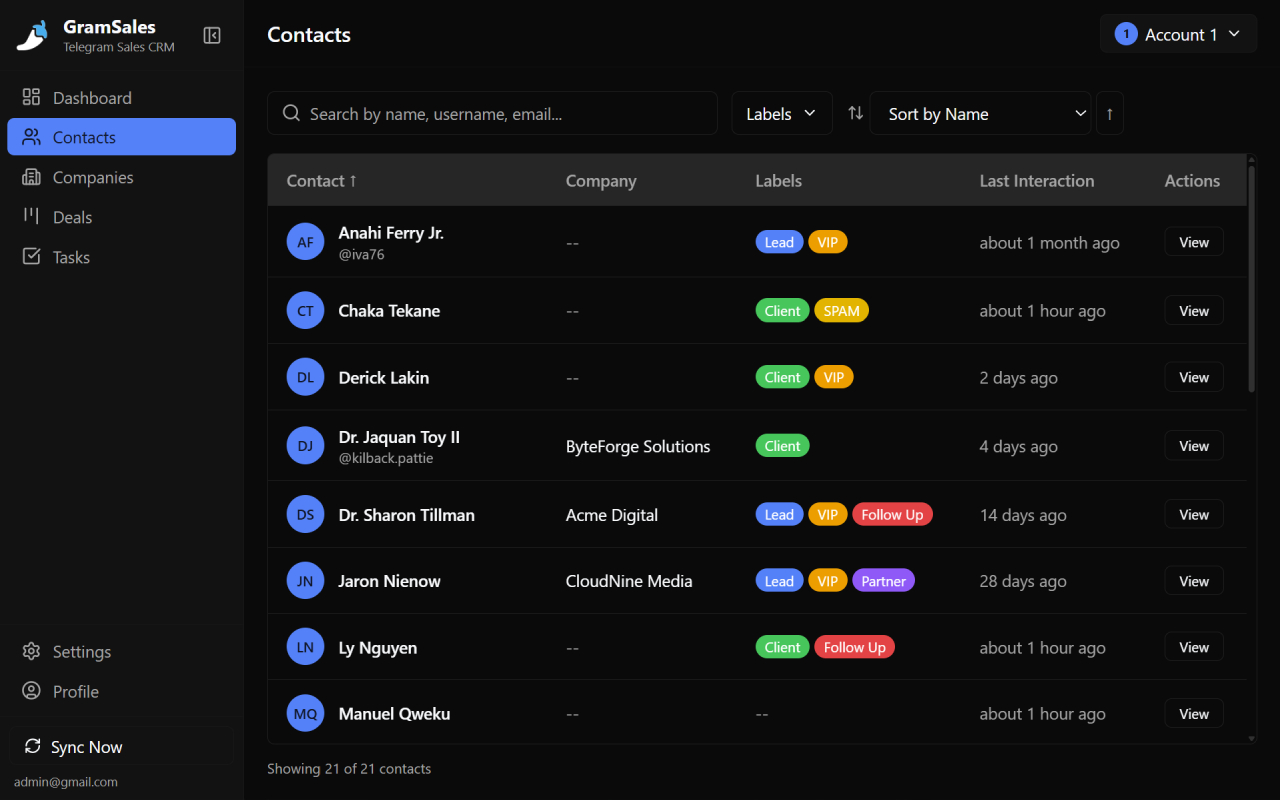
Color-coded labels show who is a lead, client or VIP right in your Telegram chat list.
Where Telegram's Built-In Tools Fall Short
Telegram does offer some basic contact features. You can save contacts with names and phone numbers, organize chats into folders, pin important conversations, and archive threads you want to revisit later. For personal use, these tools work fine. For business, they are woefully inadequate.
No Labels or Categorization
Telegram folders let you sort chats by broad categories, but they do not let you tag individual contacts with meaningful business labels like "Hot Lead," "Returning Customer," or "VIP Client." You cannot see at a glance which stage of your sales process a contact is in.
No Notes on Contacts
There is no way to attach notes to a Telegram contact. You cannot record what product they were interested in, what price you quoted, or when you last spoke. All of that context lives in the chat history, buried under hundreds of messages.
No Visual Organization
Telegram's interface treats every chat the same way. There is no color coding, no priority indicators, and no way to visually distinguish between a brand-new lead and a long-term client. When you have dozens of active conversations, this becomes a real problem.
No Export or Reporting
If you need to export your contact list, share it with a team member, or generate a report on your client base, Telegram offers no built-in way to do it. Your contacts are locked inside the app.
Strategies for Organizing Telegram Contacts
Even without additional tools, there are some manual strategies you can use to improve your Telegram contact management. These approaches help, but they have limits.
Use a Naming Convention
Some sellers add prefixes or tags to contact names -- for example, renaming "Alex" to "Alex - VIP" or "Alex [Pending Payment]." This is a workaround, not a solution. It clutters your contact list, it is easy to forget to update, and it does not scale.
Create Telegram Folders Strategically
You can create folders for different stages of your sales process: "New Leads," "In Progress," "Closed." Moving contacts between folders manually takes discipline, and folders do not carry any metadata beyond the folder name itself.
Keep External Spreadsheets
Many Telegram sellers maintain a Google Sheet or Excel file alongside their Telegram conversations. They copy and paste contact details, update statuses, and try to keep everything in sync. This works for a while, but context-switching between Telegram and a spreadsheet is slow, error-prone, and frustrating.
The core issue with all of these strategies is the same: they require you to leave Telegram or work around its limitations manually. What you really need is a solution that adds business-grade contact management directly inside Telegram.
How GramSales Transforms Telegram Contact Management
GramSales is a Chrome extension that adds a full CRM sidebar directly inside Telegram Web. Instead of switching between apps or maintaining separate spreadsheets, you manage your contacts right where your conversations happen.
Contact Labels and Color Tags
With GramSales, you can assign custom labels and color-coded tags to any Telegram contact. Create categories that match your business -- "Hot Lead," "Returning Client," "Wholesale Buyer," "Needs Follow-Up" -- and apply them with a single click. When you open your chat list, you can immediately see which contacts need attention and what stage they are in.
Notes and Reminders on Every Contact
GramSales lets you attach detailed notes to each contact. Record what they asked about, what price you quoted, any special requests, and anything else that matters. You can also set reminders so you never forget a follow-up. When a reminder fires, you are brought right back to the conversation with all the context you need.
Smart Organization Without Leaving Telegram
Because GramSales lives inside Telegram Web as a sidebar, there is no context-switching. You see your CRM data -- labels, notes, deal stages, and reminders -- right next to the conversation. This is Telegram contact management the way it should work: fast, visual, and integrated.
CSV Export for Reporting and Backup
Need to share your contact list with a team member or import it into another tool? GramSales lets you export your contacts and deal data as CSV files. Your business data is never locked in.
Dashboard Analytics
GramSales includes a dashboard that gives you an overview of your contact base and sales activity. See how many new leads you added this week, how many deals are in progress, and where your pipeline stands -- all without leaving Telegram Web.
Putting It All Together: A Contact Management Workflow
Here is a practical workflow for Telegram contact management using GramSales:
- A new lead messages you on Telegram. The GramSales sidebar appears with their contact card.
- You add a label ("New Lead") and a color tag (yellow for warm leads, red for hot leads).
- You write a note: "Interested in bulk pricing for Product X. Needs quote by Friday."
- You set a reminder for Thursday afternoon to send the quote.
- When Thursday comes, the reminder fires. You open the conversation, see your notes, and send a personalized quote using a quick reply template.
- When the deal closes, you update the label to "Customer" and move them through your sales pipeline.
This entire workflow happens inside Telegram Web. No spreadsheets, no separate CRM tabs, no lost context. If you want to take it further, the same labels feed directly into a visual Telegram sales pipeline, so every contact moves through clear deal stages instead of living in your head.
Native Telegram vs. a Telegram CRM Extension
Here is how managing contacts with Telegram's native tools compares to using a CRM extension like GramSales:
| Capability | Native Telegram | GramSales CRM extension |
|---|---|---|
| Custom contact labels & color tags | No (workarounds only) | Yes, one click |
| Notes attached to a contact | No | Yes, unlimited |
| Follow-up reminders | No | Yes, per contact |
| Deal / pipeline stages | No | Yes, kanban pipeline |
| Quick-reply templates with variables | No | Yes |
| Export contacts (CSV) | No | Yes |
| Dashboard & reporting | No | Yes |
| Works inside Telegram Web | Native | Yes, as a sidebar |
For a wider look at the tools in this category, compare options in our roundup of the best CRM tools for Telegram.
Frequently Asked Questions
Can you add labels and tags to Telegram contacts?
Not with Telegram's native app -- it offers chat folders and pins, but no per-contact labels. To tag individual contacts with categories like "Hot Lead" or "VIP Client," you need a CRM layer. GramSales adds color-coded labels and tags to any Telegram contact directly inside Telegram Web, so you can sort and prioritize at a glance.
How do I keep notes on a Telegram contact?
Telegram has no built-in field for contact notes, so the context usually lives buried in chat history. A Telegram CRM extension solves this by attaching persistent notes to each contact card. With GramSales you can record what a contact asked about, the price you quoted, and any special requests, then see those notes next to the conversation every time you reopen it.
Is there a free way to manage Telegram contacts better?
Yes. GramSales has a free plan (no credit card required) that includes core contact-management features like labels, notes, and reminders inside Telegram Web. Paid Pro and Business plans add the AI smart replies, scheduled messages, team workspaces, and higher limits. For automated nudges on every lead, see our guide to Telegram lead follow-up.
Related Guides
- Telegram CRM: the complete guide -- the full playbook for running sales and support on Telegram.
- Telegram CRM for agencies -- manage multiple clients and Telegram accounts from one workspace.
- Build a Telegram sales pipeline -- turn organized contacts into a visual kanban deal flow.
Start Managing Your Telegram Contacts Like a Pro
Telegram is a powerful platform for business, but only if you can keep your contacts organized. Native Telegram tools are not built for sales and client management. Manual workarounds do not scale. What you need is a purpose-built solution that brings CRM-level Telegram contact management directly into your workflow.
GramSales gives you labels, color tags, notes, reminders, deal tracking, and analytics -- all inside Telegram Web. The free plan gets you started with core features, and Pro and Business plans unlock the full power of the platform, backed by a 30-day refund guarantee.
Stop losing track of leads. Stop forgetting follow-ups. Install GramSales free from the Chrome Web Store and start managing your Telegram contacts like a professional, or compare plans on the pricing page.
About the author
Adam Rivera
Founder & Product Lead, GramSales
Adam has been shipping software since 2009 and leading product and engineering teams since 2012. Over nearly twelve years at GMR Marketing he went from Lead Application Developer to SVP of Digital Product & Experience Technology, where he shipped an omni-channel CRM and POS platform and stood up a data-science practice — building a stack that runs from React and .NET Core through Azure, Databricks and Python. He started GramSales to bring that same CRM thinking to where conversations actually happen: inside Telegram.
Connect on LinkedIn