
Building a Sales Pipeline on Telegram with GramSales
Learn how to build and manage a visual sales pipeline for your Telegram conversations. Track deals from first message to closed won.

Adam Rivera
Building a Sales Pipeline on Telegram with GramSales
A Telegram sales pipeline is a visual, stage-by-stage system that tracks every deal in your Telegram conversations from first message to closed won. You build one by defining clear sales stages (New Lead, Contacted, Qualified, Proposal Sent, Negotiation, Won, Lost), then moving each deal across a kanban board as the conversation progresses -- so you always know where every opportunity stands and what needs your attention next. With GramSales, that pipeline lives directly inside Telegram Web, right next to the chats it tracks.
Selling on Telegram without a pipeline is like navigating without a map. You might reach your destination eventually, but you will waste time, miss turns, and lose opportunities along the way. In this guide, we will cover what a sales pipeline is, why every Telegram seller needs one, how to define the right stages for your business, and how to build and manage your pipeline using GramSales. For the bigger picture, start with our Telegram CRM guide.
What Is a Sales Pipeline?
A sales pipeline is a visual representation of where your potential deals stand at any given moment. Think of it as a series of stages that a lead moves through on their way to becoming a customer. Each stage represents a step in your sales process, and each deal sits in the stage that reflects its current status.
Sales pipelines are typically displayed as a kanban board -- a series of columns, each representing a stage, with cards for individual deals that you drag from one column to the next as conversations progress.
The power of a sales pipeline lies in its clarity. At a glance, you can see how many deals are in play, where they are stuck, which ones need attention, and how much potential revenue is on the table.
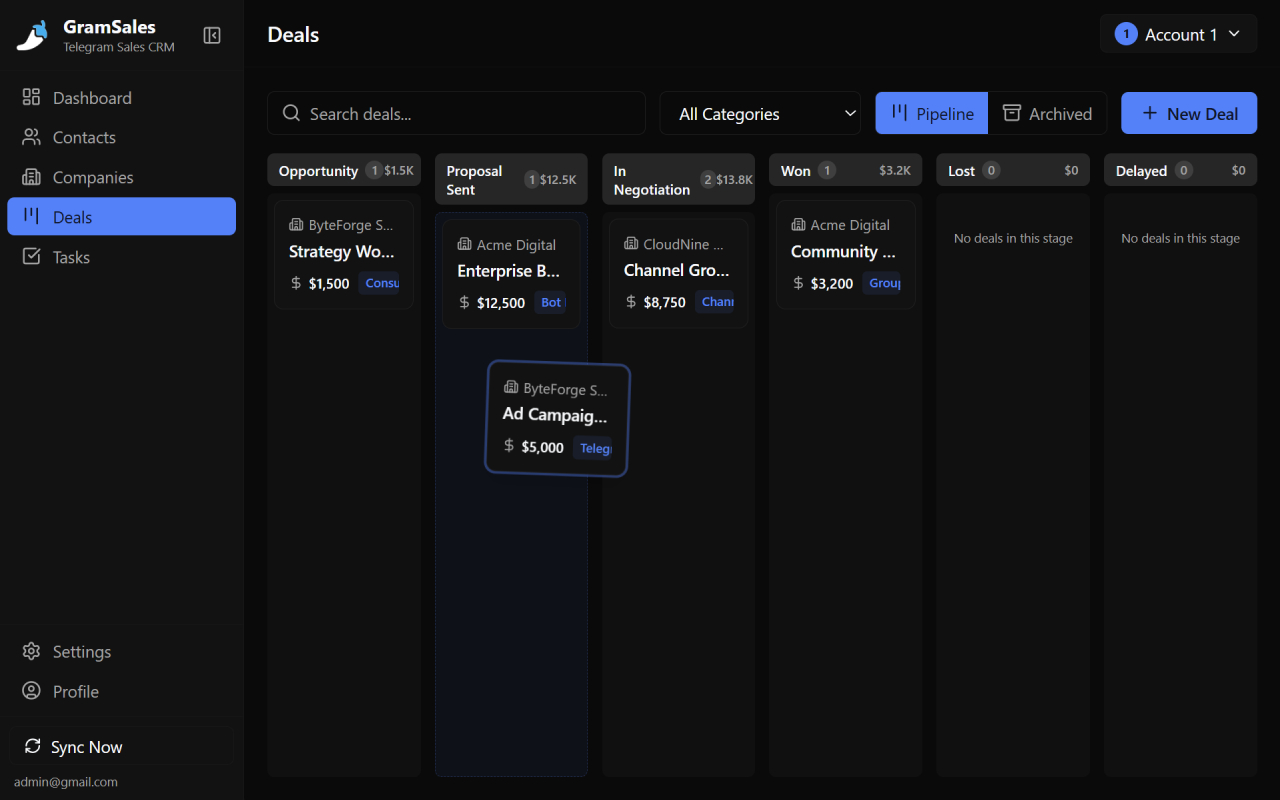
Drag deals across stages to keep your Telegram sales pipeline up to date at a glance.
Why Telegram Sellers Need a Sales Pipeline
Telegram sellers need a sales pipeline because the volume of conversations on the platform quickly outgrows what anyone can track in their head. Telegram surpassed 1 billion monthly active users in 2025, according to founder Pavel Durov, and if you are selling products or services to even a sliver of that audience, you are probably managing dozens or even hundreds of conversations at once. Without a structured Telegram sales pipeline, several problems emerge quickly.
Deals Fall Through the Cracks
When you are juggling many conversations, it is easy to forget about a lead who asked for a quote three days ago or a prospect who said they would think about it over the weekend. Without a pipeline, there is no system to remind you.
You Cannot Prioritize
Not every lead is equal. Some are ready to buy today. Others are just browsing. Without a pipeline that categorizes deals by stage, you end up giving equal attention to everyone -- which means your hottest leads do not get the urgency they deserve.
Revenue Becomes Unpredictable
If you cannot see how many deals are in progress and where they stand, you cannot forecast your revenue. A Telegram sales pipeline turns gut feelings into data, letting you plan ahead with confidence.
Scaling Is Impossible
A solo seller might keep track of twenty deals in their head. But as your business grows -- more products, more channels, more team members -- that mental model breaks down. A pipeline gives you the structure to scale.
Defining Your Telegram Sales Pipeline Stages
The right pipeline stages depend on your business, but here is a proven framework that works well for most Telegram sellers.
Stage 1: New Lead
A potential customer has initiated contact or you have identified them as a prospect. They have shown initial interest but no meaningful conversation has happened yet. The goal at this stage is to respond quickly and qualify their interest.
Stage 2: Contacted
You have responded to the lead and started a conversation. You are gathering information about their needs, answering initial questions, and building rapport. The goal is to understand whether they are a good fit for what you offer.
Stage 3: Qualified
The lead has a genuine need for your product or service, they have the budget, and they have the authority to make a decision. This is a real opportunity. The goal is to present your solution clearly and address any concerns.
Stage 4: Proposal Sent
You have sent a formal offer, a price quote, or detailed product information. The ball is in their court. The goal is to follow up appropriately and answer any remaining questions.
Stage 5: Negotiation
The lead is interested but wants to discuss terms -- price, delivery, scope, or customization. This is where deals are shaped. The goal is to find a mutually agreeable arrangement without undervaluing your offering.
Stage 6: Won
The deal is closed. Payment is received, the order is confirmed, and the customer is happy. Time to deliver and think about retention.
Stage 7: Lost
The deal did not close. The lead went with a competitor, lost interest, or was not a good fit. Recording lost deals is just as important as recording wins -- it helps you improve your process over time.
How GramSales Brings Your Telegram Sales Pipeline to Life
GramSales includes a built-in kanban deal pipeline that lives inside Telegram Web. You do not need to switch to a separate CRM or maintain an external spreadsheet. Your Telegram sales pipeline is right where your conversations happen.
Visual Kanban Board
The GramSales pipeline displays your deals as cards on a kanban board. Each column represents a stage, and each card represents a deal linked to a specific Telegram contact. You can see your entire pipeline at a glance -- how many deals are in each stage, the total value at stake, and which deals need attention.
Drag-and-Drop Deal Management
Moving a deal from one stage to the next is as simple as dragging its card to a new column. When a qualified lead receives your proposal, drag them from "Qualified" to "Proposal Sent." When they agree to your terms, drag them to "Won." The interface is intuitive and fast.
Deal Details and Context
Each deal card in GramSales stores key information: the contact name, deal value, notes, and the associated Telegram conversation. Click on a deal to see the full history, review your notes, and jump directly into the chat. You never lose context.
Integration with Contact Labels and Notes
Your Telegram sales pipeline does not exist in isolation. GramSales ties pipeline deals to your labeled contacts and their notes. When you look at a deal, you see everything -- the contact's tags, your previous notes, any reminders you have set, and the full conversation history. If you have not organized your contacts yet, our Telegram contact management guide walks through labels, color tags, and notes from scratch.
Dashboard Analytics
The GramSales dashboard provides analytics on your pipeline performance. Track how many deals you are closing, your average deal value, conversion rates between stages, and trends over time. These insights help you identify bottlenecks and optimize your sales process.
Best Practices for Telegram Sales Pipeline Management
Building a pipeline is the first step. Managing it effectively is what drives results. Here are proven best practices for getting the most out of your Telegram sales pipeline.
Review Your Pipeline Daily
Spend five minutes each morning looking at your kanban board. Identify deals that have been sitting in the same stage for too long, prioritize follow-ups for the day, and move any deals that have progressed since your last review.
Keep Deal Information Current
Update notes and deal values as conversations evolve. A pipeline is only useful if it reflects reality. When a lead changes their requirements or you adjust your pricing, update the deal card immediately.
Set Reminders for Follow-Ups
Do not rely on memory. Use GramSales reminders to schedule follow-ups for deals in the "Proposal Sent" and "Negotiation" stages. A timely follow-up can be the difference between a won deal and a lost one.
Analyze Your Lost Deals
When a deal moves to "Lost," take a moment to note why. Were you too slow to respond? Was the price too high? Did the lead go with a competitor? Over time, these patterns reveal exactly where your sales process needs improvement.
Do Not Let Your Pipeline Get Stale
If a deal has been in "Contacted" for three weeks with no response, it is time to either make one final attempt or move it to "Lost." A bloated pipeline full of dead deals gives you a false sense of opportunity. Keep it clean and honest.
Use Templates to Speed Up Pipeline Movement
Combine your Telegram sales pipeline with GramSales quick reply templates. Create templates for each stage -- an initial greeting for new leads, a proposal template for qualified prospects, a follow-up nudge for stalled deals. Templates accelerate your pipeline velocity without sacrificing personalization. See our guide to Telegram quick reply templates for ready-to-use examples, and pair them with a disciplined lead follow-up cadence so no deal goes cold.
How GramSales Compares to Other Pipeline Tools
GramSales is purpose-built to run your pipeline inside Telegram Web, rather than pulling Telegram chats into a separate dashboard. Here is how that approach compares to the broader CRM landscape, as of 2026.
| Approach | Where the pipeline lives | Best for | Trade-off |
|---|---|---|---|
| GramSales | Inside Telegram Web, next to your chats | Sellers who close deals in Telegram DMs | Focused on Telegram (not a multichannel hub) |
| Multichannel CRMs (e.g. Kommo, as of 2026, per their site) | Separate web app aggregating many channels | Teams unifying WhatsApp, IG, and Telegram in one inbox | Telegram is one channel among many; per-user pricing |
| General CRMs (HubSpot, Pipedrive) with a Telegram connector | Standalone CRM + integration | Companies with an existing CRM stack | Telegram chats sit a step removed from the pipeline |
If you are weighing a multichannel platform, our GramSales vs Kommo comparison breaks down the differences in detail, and our roundup of the best CRM tools for Telegram covers the full field.
Frequently Asked Questions
What is a Telegram sales pipeline?
A Telegram sales pipeline is a visual system that tracks each potential deal in your Telegram conversations through a series of stages -- typically New Lead, Contacted, Qualified, Proposal Sent, Negotiation, Won, and Lost. It is usually displayed as a kanban board so you can see, at a glance, how many deals are in play, where each one stands, and which need follow-up.
Can I build a sales pipeline inside Telegram itself?
Yes. With the GramSales Chrome extension, a kanban deal pipeline runs directly inside Telegram Web, so you manage deals next to the chats they belong to without switching to an external CRM or spreadsheet. Each deal card links to a specific Telegram contact along with notes, labels, and reminders. See our Telegram CRM Chrome extension guide for setup.
How many pipeline stages should I use?
For most Telegram sellers, five to seven stages strike the right balance. Too few and your pipeline lacks the granularity to spot where deals stall; too many and updating cards becomes tedious. Start with the seven-stage framework in this guide and trim or rename stages to match how you actually sell.
Is GramSales free to use?
GramSales offers a Free plan with no credit card required, which is enough to start building a pipeline. Paid plans (Pro and Business) unlock advanced features for power users and teams. See pricing for current plans, and note that paid plans include a 30-day refund window.
Related Guides
- Telegram CRM guide -- the complete pillar guide to running a CRM inside Telegram, from contacts to deals.
- GramSales vs Kommo -- how a Telegram-native pipeline compares to a multichannel messenger CRM.
- Telegram CRM for agencies -- managing pipelines across multiple accounts and team members.
From Chaos to Clarity: Build Your Pipeline Today
A Telegram sales pipeline transforms the way you sell. Instead of reacting to messages as they come in, you proactively manage your deals through a structured process. You know exactly where every opportunity stands, what needs your attention, and how your business is performing.
GramSales makes it easy to build and manage your pipeline directly inside Telegram Web. The kanban board, contact labels, notes, reminders, and dashboard analytics work together to give you a complete sales system without ever leaving your conversations.
Install GramSales free from the Chrome Web Store and start with the Free plan -- no credit card required. When you are ready for advanced pipeline features and team workspaces, explore Pro and Business pricing. Your future self -- and your revenue -- will thank you.
About the author
Adam Rivera
Founder & Product Lead, GramSales
Adam has been shipping software since 2009 and leading product and engineering teams since 2012. Over nearly twelve years at GMR Marketing he went from Lead Application Developer to SVP of Digital Product & Experience Technology, where he shipped an omni-channel CRM and POS platform and stood up a data-science practice — building a stack that runs from React and .NET Core through Azure, Databricks and Python. He started GramSales to bring that same CRM thinking to where conversations actually happen: inside Telegram.
Connect on LinkedIn