
Telegram CRM for Agencies: One Workspace for Every Client
Agencies manage clients over Telegram. A Telegram CRM gives every client a workspace, shared pipeline, tasks and team roles — in one place.

Adam Rivera
Why Agencies Need a Telegram CRM
A Telegram CRM gives an agency one organized system for every client conversation, deal, and task that currently lives scattered across personal chats. If your account managers, media buyers, and freelancers all coordinate with clients over Telegram, you already know the problem: each person holds context in their own head, follow-ups depend on memory, and onboarding a new team member means scrolling through months of chat history.
Agencies are an unusually good fit for Telegram. It is fast, international, and the channel clients actually answer on. But Telegram was built for messaging, not for running a client portfolio. The moment you are juggling ten clients across three team members, you need structure on top of the chat. That is exactly what a Telegram CRM adds, and GramSales adds it directly inside Telegram Web as a Chrome extension, so your team never leaves the conversation to stay organized.
If you are new to the category, start with the pillar Telegram CRM guide for the fundamentals, then come back here for the agency-specific playbook.
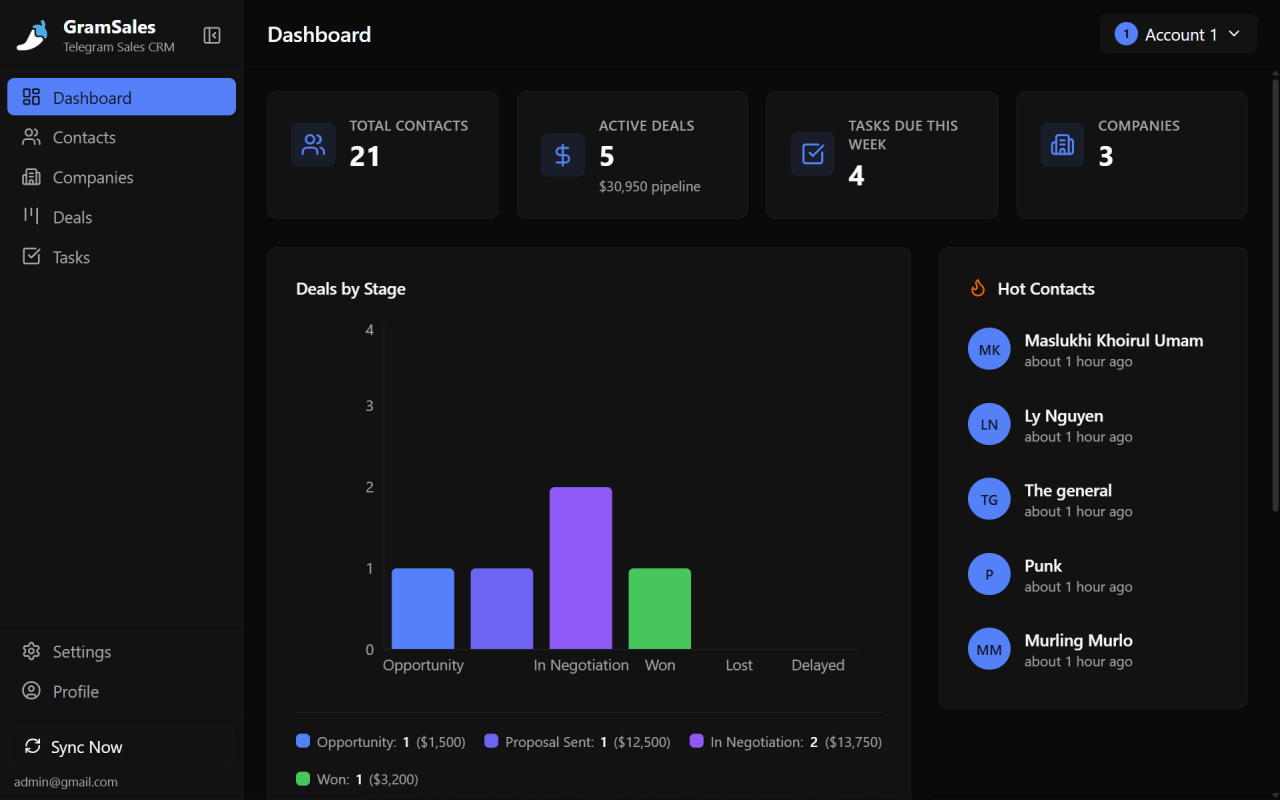
A shared workspace gives agencies one dashboard for every client conversation.
Separate Workspaces for Every Client or Brand
A workspace is an isolated container for one client's contacts, deals, notes, and tasks, so data never bleeds between accounts. This is the single most important concept for agencies, because the alternative — one giant shared list — turns into chaos the instant you add a second client.
With GramSales workspaces, you can structure your agency in the way that matches how you actually bill and deliver:
- One workspace per client — keep Client A's leads, pipeline, and notes completely separate from Client B's.
- One workspace per brand — useful when a single client runs several brands or sub-accounts.
- One workspace per function — for example, a "New Business" workspace for your own agency pipeline plus a workspace for each retainer client.
Because each workspace is isolated, a freelancer you bring on for one client only sees that client's data. When the engagement ends, you remove their access and nothing else is exposed. That isolation is what makes a Telegram CRM safe to run across a portfolio rather than a single account.
Team Roles: Owner, Member, and Viewer
Roles control what each teammate can do inside a workspace, so you can collaborate without giving everyone the keys to everything. GramSales workspaces support three roles, which map cleanly onto how agencies are staffed.
| Role | Typical agency use | Can manage data | Can invite/remove members | Can change workspace settings |
|---|---|---|---|---|
| Owner | Agency founder or account director | Yes | Yes | Yes |
| Member | Account managers, media buyers, SDRs | Yes | No | No |
| Viewer | Clients, auditors, junior staff | Read-only | No | No |
A few practical patterns this unlocks:
- Make the client a Viewer in their own workspace so they can watch the pipeline and read notes without accidentally moving a deal or editing a contact.
- Make delivery staff Members so they can log notes, update deals, and complete tasks, but cannot remove teammates or restructure the workspace.
- Keep the Owner seat with leadership so account access, billing, and member management stay controlled.
Roles plus per-client workspaces are the combination that lets an agency scale its team without losing control of client data.
Shared Contacts, Deals, and Notes
Everything your team logs in a workspace is shared instantly with everyone in that workspace, which kills the single biggest agency problem: knowledge trapped in one person's chat. When an account manager adds a note about a client's budget cycle, the rest of the team sees it. When a media buyer tags a stakeholder as the decision-maker, that label shows up for everyone.
Inside each client workspace, your team works with the same toolkit:
- Contact labels and color tags to mark decision-makers, billing contacts, and stakeholders at a glance — visible right in the Telegram chat list. Our Telegram contact management guide goes deeper on tagging strategy.
- Notes attached to any conversation, capturing the context a teammate would otherwise have to ask for — campaign history, preferences, past deliverables.
- Quick-reply templates with variables so every account manager sends consistent, on-brand answers to common client questions, with the contact's name filled in automatically.
Shared data also makes coverage painless. If an account manager is out, a colleague opens the same workspace, reads the notes, and picks up the thread without missing a beat. Nothing depends on one person being online.
A Shared Pipeline for Client and Agency Deals
A deal pipeline is a visual board that tracks every opportunity from first contact to closed, and for agencies it works two ways at once. You can run a pipeline inside a client's workspace to track that client's leads, and you can run a separate pipeline in your own new-business workspace to track your agency's own sales.
GramSales uses a kanban-style pipeline you drag deals across as they progress. Typical agency stages look like:
- Lead — a new prospect just landed in the workspace.
- Qualified — you have confirmed budget and fit.
- Proposal sent — the scope and quote are out.
- Negotiation — terms are being worked out.
- Won / Lost — the outcome is recorded with a deal value.
Because the pipeline is shared, your account director can open any workspace and instantly see where every deal stands, what it is worth, and who owns it — no status-update meeting required. For a full walkthrough of stage design and pipeline hygiene, see building a Telegram sales pipeline.
Tasks and Follow-Up Reminders Tied to Contacts
Tasks and reminders connect an action to a specific contact and deadline, so nothing depends on memory. This is where agencies leak the most revenue: a client asks for a revised proposal "next week," it gets buried under newer chats, and by the time anyone remembers, the moment has passed.
With a Telegram CRM, you attach the follow-up to the conversation itself:
- Follow-up reminders fire at the time you set, surfacing the right chat at the right moment instead of letting it sink in the chat list.
- Tasks linked to contacts and deals make ownership explicit — who is sending the deck, who is chasing the signature, who is onboarding the new account.
- Companies let you group every contact at a client organization, so you see all the people and deals connected to one account in a single view.
Research on attention by Gloria Mark and colleagues at UC Irvine has documented how costly it is to recover focus after an interruption (UC Irvine). Reminders that live next to the conversation mean your team is not constantly bouncing between Telegram and a separate task app just to remember what is due — the prompt appears where the work already happens.
Multi-Account Support for Agencies That Run Several Telegram Profiles
Multi-account support lets you connect more than one Telegram account and switch between them without logging out, which matches how many agencies actually operate. You might have a personal outreach account, a dedicated agency support account, and an account you manage on a client's behalf. GramSales supports switching between multiple Telegram accounts, and your workspaces layer on top of whichever account you are using.
The result is a clean separation of two different concerns:
- Accounts are the Telegram identities you message from.
- Workspaces are the CRM containers your team collaborates in.
That distinction lets a five-person agency run a dozen client relationships across several Telegram identities while keeping each client's CRM data isolated and each teammate's access scoped to exactly what they should see.
How GramSales Compares to Other Agency Setups
Here is how an in-Telegram CRM stacks up against the approaches agencies commonly cobble together. Competitor details below are as of 2026, per each vendor's own site and listing.
| Approach | Works inside Telegram | Per-client isolation | Team roles | Cost signal |
|---|---|---|---|---|
| GramSales | Yes (native sidebar) | Yes (workspaces) | Owner / Member / Viewer | Free plan; Pro from $12/mo annual |
| Shared spreadsheet | No | Manual tabs | None real | Free, but breaks down fast |
| Generic CRM + Telegram bot | No (external dashboard) | Yes | Yes | Often $20-100+/mo per seat |
| Telegram-native SaaS (e.g. Entergram, CRMChat) | Separate web app | Yes | Yes | Per-seat / per-account plans, as of 2026 per their sites |
Telegram-native SaaS platforms like Entergram and CRMChat are capable tools, and both lean into multi-account, team-oriented workflows. The genuine trade-off is where the work happens: those run as their own web apps your team logs into, while GramSales keeps the CRM inside Telegram Web itself, next to the chats. If your team practically lives in Telegram all day, removing the context switch is the difference that compounds. For a wider field, see our best CRM tools for Telegram comparison.
A Concrete Agency Workflow with GramSales
Putting it together, here is how a small agency might run a single retainer client end to end:
- Create a workspace named after the client and invite the two account managers as Members and the client's main contact as a Viewer.
- Import and label contacts — tag the decision-maker, the billing contact, and the day-to-day stakeholder with color codes visible in the Telegram chat list.
- Group them under a Company record so the whole account is visible in one place.
- Set up the pipeline with stages from Lead to Won, and add the active opportunities with their deal values.
- Write quick-reply templates for recurring questions — status updates, scheduling, and reporting — so every account manager answers consistently.
- Attach tasks and reminders for each deliverable, linked to the right contact, so nothing relies on memory.
- Repeat per client, each in its own isolated workspace, all reachable from the same Telegram Web window.
The whole system lives where your conversations already are. No tab switching, no separate dashboard to keep updated, no client data spilling between accounts.
Frequently Asked Questions
Can each client have its own separate space in GramSales?
Yes. GramSales uses workspaces, and you can create one workspace per client or brand. Each workspace keeps its contacts, deals, notes, and tasks fully isolated from the others, so data never crosses between accounts.
Can I give clients read-only access to their workspace?
Yes. Add the client to their workspace as a Viewer. They can see the pipeline and read notes but cannot move deals, edit contacts, or change settings. Your delivery team works as Members, and leadership keeps the Owner role.
Does GramSales support multiple Telegram accounts for an agency?
Yes. GramSales supports switching between multiple connected Telegram accounts without logging out. Your CRM workspaces layer on top, so you can run several Telegram identities while keeping each client's data scoped to the right workspace and the right teammates.
How much does a Telegram CRM for an agency cost?
GramSales offers a free plan with no credit card required. Paid plans start at $12 per month (billed annually) for Pro and $25 per month (billed annually) for Business, which adds team features for collaborating across workspaces. See the pricing page for full details, and note there is a 30-day refund window.
Do my team members need to install anything?
Each teammate installs the GramSales Chrome extension in their own Chromium-based browser — Chrome, Edge, or Brave — and signs in. Once they are added to a workspace with the right role, they see exactly the client data they are permitted to access, right inside Telegram Web.
Run Your Whole Client Portfolio Inside Telegram
If your agency runs on Telegram, your CRM should too. Separate workspaces per client, owner/member/viewer roles, shared contacts and pipelines, and reminders that live next to the conversation give your team the structure to scale without losing the speed Telegram is known for.
Install GramSales from the Chrome Web Store and start with the free plan — no credit card needed. When you are ready to add your team across multiple client workspaces, compare options on the pricing page. Give every client a home inside Telegram, and give your team one place to manage them all.
About the author
Adam Rivera
Founder & Product Lead, GramSales
Adam has been shipping software since 2009 and leading product and engineering teams since 2012. Over nearly twelve years at GMR Marketing he went from Lead Application Developer to SVP of Digital Product & Experience Technology, where he shipped an omni-channel CRM and POS platform and stood up a data-science practice — building a stack that runs from React and .NET Core through Azure, Databricks and Python. He started GramSales to bring that same CRM thinking to where conversations actually happen: inside Telegram.
Connect on LinkedIn