
5 Best CRM Tools for Telegram in 2026
Compare the top CRM tools for Telegram users in 2026. Find the best solution to manage contacts, track deals, and grow sales on Telegram.

Adam Rivera
Finding the Best CRM for Telegram
The best CRM for Telegram in 2026 is one that works where your conversations already happen, and for most sellers and small teams that means a native in-Telegram-Web tool like GramSales. Telegram itself does not include built-in deal tracking, contact organization, or follow-up reminders, so you need a layer on top to turn chats into a managed sales process. With Telegram reaching more than 1 billion monthly active users as of 2026, the volume of business now happening inside the app makes that missing CRM layer worth solving properly.
Not all CRM solutions work the same way with Telegram. Some integrate natively, others rely on bots, and some require manual workarounds. In this guide, we compare the five main approaches to CRM for Telegram users in 2026 so you can find the best Telegram CRM for your needs. For a deeper foundation on the category, see our complete Telegram CRM guide.
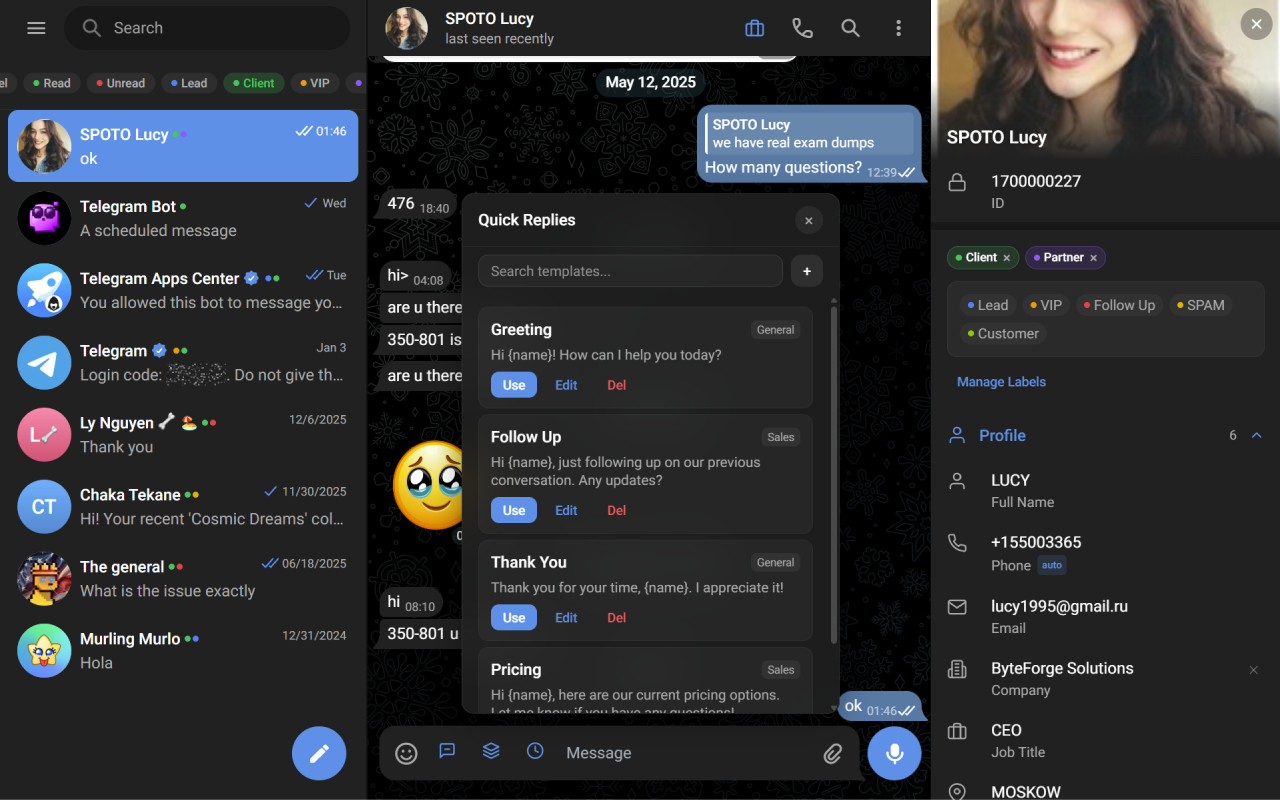
GramSales adds a full CRM sidebar to Telegram Web — labels, notes, deals and quick replies next to every chat.
1. GramSales -- Native In-Telegram CRM
Best for: Sellers, freelancers, and small businesses who work primarily in Telegram.
GramSales is a Chrome extension that embeds a full CRM directly inside Telegram Web. Rather than connecting Telegram to an external platform, GramSales adds a sidebar to your existing Telegram interface with contact management, deal tracking, and productivity tools.
Key Features
- CRM sidebar that appears alongside Telegram Web conversations
- Contact labels and color-coded tags visible in the chat list
- Notes and reminders attached to each conversation
- Kanban-style deal pipeline for tracking sales
- Quick reply templates with variable substitution
- AI-powered smart replies, translation, and message summarization
- Dashboard analytics for sales performance
- Scheduled messages and CSV export
- Support for multiple Telegram accounts
Pricing
Free plan available. Pro plan at $12/month (annual) or $19/month (monthly). Business plan at $25/month (annual) or $39/month (monthly). Full details on the pricing page.
Why It Stands Out
GramSales is the best Telegram CRM for users who want zero friction. Because it lives inside Telegram Web, there is no context switching, no external dashboards to check, and no copy-pasting data between apps. You manage everything where your conversations already happen. The AI features and quick reply templates also make it one of the most productive options available. Think of it as "like WAPlus for WhatsApp, but purpose-built for Telegram." It installs as a Chrome extension on Chrome, Edge, or Brave, and there is a free plan with no credit card required, so you can try the full workflow before paying. If your main job is staying on top of replies, see how it handles lead follow-up and a visual sales pipeline.
2. Generic CRM with Telegram Bot Integration (HubSpot, Pipedrive)
Best for: Teams already using a major CRM who want to add Telegram as a channel.
Platforms like HubSpot and Pipedrive offer Telegram integrations, typically through third-party connectors or their built-in marketplace. These integrations usually work by connecting a Telegram bot to your CRM, forwarding messages into the CRM interface where agents can respond.
How It Works
You create a Telegram bot, connect it to your CRM through an integration tool like Zapier or a native connector, and incoming Telegram messages appear as tickets or conversations inside the CRM dashboard. Responses are sent back through the bot.
Strengths
- Leverages a full-featured CRM platform you may already pay for
- Centralizes communication from multiple channels (email, phone, Telegram) in one place
- Strong reporting and automation capabilities
Limitations
- Conversations happen through a bot, not your personal or business Telegram account
- Customers interact with a bot handle rather than a real person, which can feel impersonal
- Requires setup and ongoing maintenance of the integration
- You work inside the CRM interface, not inside Telegram
- Costs can be high, as major CRMs charge per seat with Telegram add-ons on top
Best Use Case
This approach works best for larger teams that already use HubSpot or Pipedrive and want Telegram as one of many support channels. It is less ideal for individuals or small teams who primarily sell through personal Telegram conversations.
3. Telegram Bot-Based CRMs
Best for: Tech-savvy users comfortable building and managing bots.
Several CRM tools built specifically for Telegram operate through the Telegram Bot API. These tools let you create a bot that logs conversations, tags contacts, and tracks interactions. Some offer web dashboards for viewing data, while others are managed entirely through bot commands. This category also includes hosted Telegram-native CRMs such as Kommo and 3RM. Kommo (as of 2026, per their site) is a messenger-based CRM priced from $15 to $45 per user per month with a six-month minimum commitment, while 3RM (as of 2026, per its Chrome Web Store listing) is a Telegram-Web extension with a free core tier and a Web3 focus. We compare these head-to-head in GramSales vs Kommo and GramSales vs 3RM.
How It Works
You set up a Telegram bot and configure it to monitor groups, channels, or direct messages. The bot captures messages, logs contact information, and lets you add tags or notes through special commands. A separate web dashboard provides analytics and pipeline views.
Strengths
- Purpose-built for Telegram
- Can work inside Telegram groups and channels
- Often affordable or open-source
Limitations
- Requires technical knowledge to set up and customize
- Interacting with a CRM through bot commands is clunky compared to a visual interface
- Bots cannot access messages in private conversations unless users interact with the bot directly
- Limited UI compared to dedicated CRM platforms
- Reliability depends on the bot's hosting and maintenance
Best Use Case
Bot-based CRMs are a reasonable choice for technical users who need CRM functionality within Telegram groups or channels and are comfortable managing bot infrastructure. They are less practical for managing one-on-one sales conversations at scale.
4. Spreadsheet-Based Tracking (Google Sheets, Excel)
Best for: Solopreneurs just getting started with very few contacts.
The spreadsheet approach is the most common starting point. You create a Google Sheet or Excel file with columns for contact name, Telegram handle, deal stage, notes, and follow-up dates. Some people enhance this with Google Forms or Zapier automations to reduce manual data entry.
How It Works
Every time you have a meaningful conversation on Telegram, you switch to your spreadsheet and log the details. You manually update deal stages, add notes, and check the sheet periodically for follow-up reminders.
Strengths
- Free or very low cost
- Completely customizable to your needs
- No learning curve for the tool itself
- Easy to share with a small team
Limitations
- Entirely manual -- every update requires switching away from Telegram
- No integration with Telegram, so data entry is error-prone and time-consuming
- No automated reminders or notifications
- Difficult to scale beyond 20-30 active contacts
- No analytics unless you build them yourself
- Easy to forget updates, leading to stale and unreliable data
Best Use Case
Spreadsheets work for someone just starting out with a handful of contacts who wants to build a basic system before investing in a dedicated CRM for Telegram. But the manual effort becomes unsustainable quickly as your contact list grows.
5. Manual Approach (No CRM)
Best for: Users with very few conversations who rely on memory and Telegram's built-in features.
Some Telegram sellers simply use Telegram's native features -- pinned messages, saved messages, and chat folders -- to stay organized. They rely on memory for follow-ups and scroll through chat history to recall context.
How It Works
You pin important messages, save key details in Telegram's Saved Messages, and organize chats into folders. Follow-ups are tracked mentally or with a basic to-do app.
Strengths
- Zero cost and zero setup
- No additional tools to learn
- Works fine with very low volume
Limitations
- Completely falls apart beyond a handful of active conversations
- No pipeline visibility or deal tracking
- Follow-ups depend entirely on memory
- No analytics or performance insights
- Impossible to hand off to a team member
- Lost leads and missed revenue are inevitable as volume grows
Best Use Case
This approach only works if you have fewer than ten active conversations and do not plan to scale. For anyone serious about growing their business on Telegram, a proper CRM is essential.
Comparing the Best CRM Options for Telegram
| Approach | Works Inside Telegram | Setup Effort | Cost | Scalability |
|---|---|---|---|---|
| GramSales | Yes (native sidebar) | Minimal | Free to $39/mo | High |
| Generic CRM + Bot | No (external dashboard) | High | $20-100+/mo per seat | High |
| Bot-Based CRM | Partial (bot commands) | Medium-High | Varies | Medium |
| Spreadsheet | No | Low | Free | Low |
| Manual | Yes (limited) | None | Free | Very Low |
Which CRM for Telegram Should You Choose?
The best Telegram CRM depends on your specific situation, but for most Telegram sellers and small business owners, GramSales offers the strongest combination of features, ease of use, and value. It is the only option that puts a full CRM inside Telegram Web itself, eliminating the friction that makes other approaches fall short.
If you already run a large sales operation on HubSpot or Pipedrive, adding their Telegram integration makes sense. But if Telegram is your primary sales channel, a purpose-built Telegram CRM like GramSales will serve you far better than trying to bolt messaging onto a generic platform. If you are weighing a WhatsApp-first tool instead, our GramSales vs WAPlus comparison shows how the two approaches differ.
Related Guides
- Telegram CRM: The Complete Guide — the pillar overview of what a Telegram CRM is, who needs one, and how to choose.
- GramSales vs Kommo — native in-Telegram CRM versus a multichannel messenger CRM.
- GramSales vs 3RM — two in-Telegram-Web extensions compared on features and focus.
- GramSales vs WAPlus — the Telegram-native option versus the popular WhatsApp CRM.
Frequently Asked Questions
What is the best CRM for Telegram in 2026?
For most individual sellers, freelancers, and small teams whose primary channel is Telegram, the best CRM is a native in-Telegram-Web tool like GramSales, because it adds contact management, a deal pipeline, reminders, and AI replies without making you leave Telegram. Larger teams already standardized on HubSpot or Pipedrive may prefer a bot integration so Telegram becomes one of many support channels. The right choice depends on whether Telegram is your main sales channel or just one of several.
Is there a free CRM for Telegram?
Yes. GramSales offers a free plan with no credit card required, and some bot-based and hosted tools (such as 3RM's core tier, as of 2026 per its store listing) also have free options. Spreadsheets and Telegram's built-in features like saved messages and folders are free too, but they are manual and stop scaling past a few dozen contacts. A free CRM plan is the lowest-friction way to test a real workflow before upgrading.
Do I need a Telegram bot to use a CRM?
No. Bot-based CRMs require you to create and host a Telegram bot, which means customers interact with a bot handle rather than your real account. A native extension like GramSales works directly inside your existing Telegram Web session, so your conversations stay personal and you skip the bot setup and maintenance entirely.
Can I use a Telegram CRM with multiple accounts?
Yes. GramSales supports multiple Telegram accounts and team workspaces with roles, which is useful for agencies and sellers who run more than one number. Many hosted Telegram CRMs also offer multi-account inboxes, often priced per seat or per connected account.
Start with the free plan, explore the features, and see how much smoother your Telegram sales process can be. Install GramSales from the Chrome Web Store to get the full CRM inside Telegram Web in a couple of clicks, compare plans on the pricing page, or read more tips on the GramSales blog. Every paid plan is backed by a 30-day refund.
About the author
Adam Rivera
Founder & Product Lead, GramSales
Adam has been shipping software since 2009 and leading product and engineering teams since 2012. Over nearly twelve years at GMR Marketing he went from Lead Application Developer to SVP of Digital Product & Experience Technology, where he shipped an omni-channel CRM and POS platform and stood up a data-science practice — building a stack that runs from React and .NET Core through Azure, Databricks and Python. He started GramSales to bring that same CRM thinking to where conversations actually happen: inside Telegram.
Connect on LinkedIn