
Quick Reply Templates for Telegram: Save Hours Every Week
Create and use quick reply templates with variables in Telegram. Respond to customers faster without sacrificing personalization.

Adam Rivera
Quick Reply Templates for Telegram: Save Hours Every Week
Quick reply templates for Telegram are pre-written messages you save once and send in a single click, with variables like {first_name} that auto-fill each contact's details so every message feels personal. They let you answer the same greeting, pricing, and follow-up questions in seconds instead of retyping them dozens of times a day.
Every Telegram seller knows the feeling. You type the same greeting for the twentieth time today. You copy and paste your pricing details again. You rewrite the same follow-up message with minor variations for each customer. It is repetitive, it is slow, and it pulls your focus away from what actually matters -- building relationships and closing deals. Telegram quick replies fix this problem entirely.
Quick reply templates let you save your most-used messages and send them with a single click. Better yet, with variable substitution, each template feels personal to the recipient even though it took you seconds instead of minutes. In this guide, we will show you why speed matters, how Telegram templates work, and how to set up a template library that saves you hours every week.
Why Speed Matters in Telegram Sales Conversations
In sales, speed is not just a convenience -- it is a competitive advantage. Responding quickly while a prospect is still actively interested generally gives you a better shot at the deal than letting an inquiry sit. On Telegram -- a platform with 800M+ monthly active users as of 2024, per Telegram -- customers expect near-instant communication, and a slow response can mean a lost sale. For a deeper look at building speed into your whole process, see our Telegram lead follow-up guide.
But speed without quality is just as damaging. A rushed, generic message tells the customer they are not important to you. The challenge is maintaining both speed and personalization across dozens or hundreds of daily conversations. That is exactly what Telegram quick replies are designed to solve.
When you have pre-written templates ready to go, you eliminate the time spent composing routine messages. When those templates include variables that automatically insert the customer's name or other details, you maintain the personal touch that builds trust. The result is faster responses that feel individually crafted.
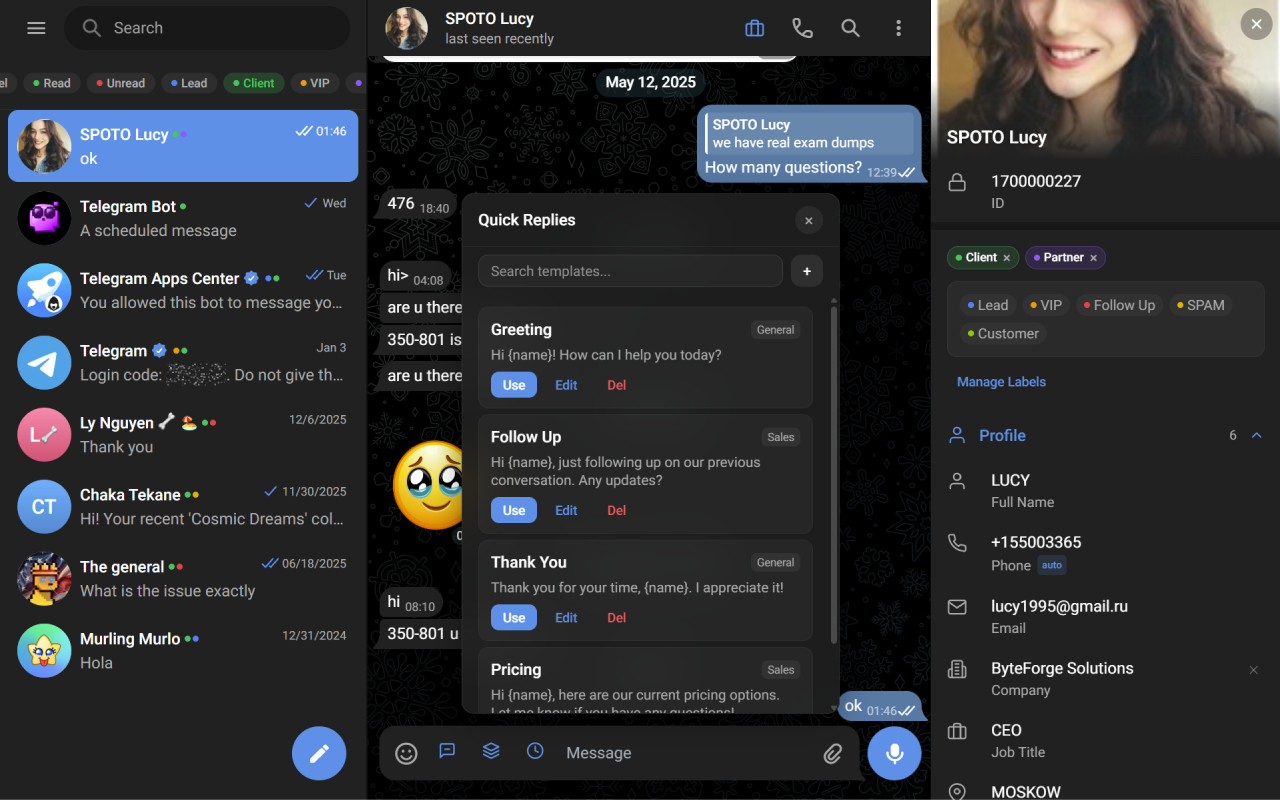
Save your best responses as quick replies and drop them into any Telegram chat in one click.
What Are Quick Reply Templates?
Quick reply templates are pre-written messages that you save and reuse across conversations. Instead of typing a response from scratch every time a customer asks about your pricing, you select your "Pricing" template and send it in one click.
The best Telegram templates go beyond static text. They include variables -- placeholders that get replaced with real data when you send the message. For example, a template might read: "Hi {first_name}, thanks for reaching out! Here is our current pricing..." When you send this to a contact named Sarah, she sees: "Hi Sarah, thanks for reaching out! Here is our current pricing..."
This combination of speed and personalization is what makes quick reply templates so powerful for Telegram sales.
Examples of High-Impact Telegram Templates
Building the right template library is the key to maximizing your time savings. Here are the categories and examples that every Telegram seller should have ready.
Greeting Templates
First impressions matter. A warm, professional greeting sets the tone for the entire conversation.
Welcome - New Lead: "Hi {first_name}, thanks for reaching out to us! I would be happy to help you. Could you tell me a bit more about what you are looking for so I can point you in the right direction?"
Welcome - Returning Customer: "Hi {first_name}, great to hear from you again! How can I help you today?"
These Telegram quick replies ensure every new conversation starts professionally, even when you are handling ten chats at once.
Pricing Templates
Pricing questions are among the most common inquiries sellers receive. Having a clear, well-structured pricing template saves enormous time.
Standard Pricing: "Hi {first_name}, here is a quick overview of our pricing: [insert your pricing tiers]. If you have any questions or want to discuss a custom arrangement, just let me know!"
Bulk/Wholesale Pricing: "Hi {first_name}, we do offer special pricing for bulk orders. Could you let me know the quantity you are interested in? I will put together a custom quote for you."
Follow-Up Templates
Follow-ups close deals. Most sellers know this, but following up consistently is hard when you are busy. Telegram templates make it effortless.
Gentle Follow-Up (2-3 days): "Hi {first_name}, I wanted to follow up on our conversation from earlier this week. Do you have any questions I can help with, or are you ready to move forward?"
Re-Engagement (1-2 weeks): "Hi {first_name}, I hope you are doing well! I wanted to check in and see if you are still interested in [product/service]. We would love to help if you are ready."
Post-Purchase Follow-Up: "Hi {first_name}, I hope you are enjoying your [product/service]! If you have any questions or need anything at all, do not hesitate to reach out. We appreciate your business."
Closing Templates
When a deal is near the finish line, the right message can push it across.
Closing - Ready to Buy: "Hi {first_name}, it sounds like [product/service] is a great fit for what you need. Want me to go ahead and set everything up for you?"
Closing - Limited Availability: "Hi {first_name}, just a heads up that [product/service] is in high demand right now and availability is limited. If you would like to secure yours, now would be a great time."
FAQ Response Templates
Certain questions come up over and over. Having ready-made answers saves significant time and ensures accuracy.
Shipping Information: "Great question, {first_name}! We ship to [regions] and typical delivery takes [timeframe]. Tracking information is provided once your order ships."
Return Policy: "Hi {first_name}, we offer [return policy details]. If you need to start a return, just message us here and we will walk you through it."
How Variable Substitution Works
Variable substitution is what transforms a generic template into a personal message. In GramSales, variables are placeholders wrapped in curly braces that get replaced with real contact data when you send the message.
Common variables include the contact's first name, last name, and other details stored in your GramSales CRM. When you select a template and send it, the system automatically pulls the relevant data from the contact card and inserts it into the message.
This means your Telegram templates are never truly generic. Even a template sent to a hundred different people will feel personal to each recipient because their name and relevant details are woven into the text naturally. The customer experiences a personal message. You experience a one-click send.
The key to effective variable use is subtlety. Do not overload a message with variables -- one or two personal touches per message is enough to create warmth without feeling robotic. The most impactful variable is almost always the contact's first name, used naturally in the greeting.
How GramSales Implements Telegram Quick Replies
GramSales brings quick reply templates directly into Telegram Web through its CRM sidebar. Here is how the workflow looks in practice.
Creating Templates
Open the GramSales sidebar in Telegram Web and navigate to the templates section. Create a new template by giving it a name (for easy searching later) and writing your message with any variables you want to include. Save it, and it is instantly available across all your conversations.
Using Templates in Conversations
When you are chatting with a customer and want to use a template, open the template panel in the sidebar. Search or browse your templates, select the one you want, and it populates the message field with the variables already replaced using the current contact's data. Review it, make any last-second adjustments, and send.
Organizing Your Template Library
As your library grows, organization matters. GramSales lets you categorize your Telegram templates so you can find the right one quickly. Group them by purpose -- greetings, pricing, follow-ups, FAQ responses, closing -- and you will always have the right message at your fingertips.
Combining Templates with Other GramSales Features
Telegram quick replies become even more powerful when combined with other GramSales features. Use templates alongside your sales pipeline to send stage-appropriate messages. Pair them with reminders so that when a follow-up reminder fires, you can send a follow-up template in seconds. Layer them with AI smart replies for situations where you need something more customized than a template but faster than writing from scratch. To see how templates fit into a complete setup, read the full Telegram CRM guide.
Building Your Template Library: Best Practices
Start with the messages you send most often. Look through your recent Telegram conversations and identify the five to ten messages you type repeatedly. Turn those into templates first -- that is where the immediate time savings are.
Write templates in your natural voice. If your templates sound stiff or overly formal compared to how you usually communicate, customers will notice the disconnect. Write them the way you actually talk to customers, then polish for clarity and professionalism.
Review and update templates monthly. Your products change, your pricing changes, your process changes. Set a monthly reminder to review your template library and update anything that is outdated.
Keep templates concise. Long messages get skimmed or ignored on Telegram. Aim for three to five sentences per template. If you need to share more detail, break it into a short message plus a follow-up.
Frequently Asked Questions
Does Telegram have built-in quick reply templates?
Telegram's standalone Business app offers some quick-reply features for business accounts, but Telegram Web on desktop has no native template system for everyday selling. Quick reply templates with variable substitution come from a tool like GramSales, which adds them directly inside Telegram Web through a CRM sidebar -- no separate app or copy-paste workflow required.
How do variables work in a quick reply template?
Variables are placeholders wrapped in curly braces, such as {first_name}, that get replaced with real contact data the moment you send a message. When you select a template for a contact named Sarah, Hi {first_name} becomes Hi Sarah automatically. GramSales pulls those details from the contact card in your CRM, so a single template stays personal across hundreds of conversations.
Can I use quick reply templates for free?
Yes. The GramSales Free plan includes template functionality with no credit card required, so you can build and use a starter library right away. Pro and Business plans add advanced capabilities like AI smart replies and expanded template management for higher-volume teams.
How many Telegram templates should I create?
Start with the five to ten messages you send most often -- greetings, pricing, follow-ups, and FAQ answers -- then expand as patterns emerge. Quality and organization matter more than quantity. A focused, well-categorized library you can search in seconds beats a sprawling one you have to dig through mid-conversation.
Related Guides
- Telegram CRM: The Complete Guide -- the pillar guide to running your entire sales workflow inside Telegram.
- Telegram CRM for E-commerce -- how online sellers use templates, labels, and pipelines to handle order and product questions at scale.
- How to Sell on Telegram -- a step-by-step playbook for turning Telegram chats into paying customers.
Stop Retyping, Start Selling
Every minute you spend retyping the same message is a minute you are not spending on high-value sales activities. Telegram quick replies give you that time back -- without sacrificing the personal touch that makes customers feel valued.
GramSales makes it simple. Create your templates, add variables for personalization, and start sending professional, personalized messages in seconds. The free plan includes template functionality to get you started, and Pro and Business plans unlock advanced features like AI smart replies and expanded template management.
Your customers deserve fast, personal responses. Your business deserves the efficiency. Install GramSales free from the Chrome Web Store, compare plans and pricing, and save hours every week.
About the author
Adam Rivera
Founder & Product Lead, GramSales
Adam has been shipping software since 2009 and leading product and engineering teams since 2012. Over nearly twelve years at GMR Marketing he went from Lead Application Developer to SVP of Digital Product & Experience Technology, where he shipped an omni-channel CRM and POS platform and stood up a data-science practice — building a stack that runs from React and .NET Core through Azure, Databricks and Python. He started GramSales to bring that same CRM thinking to where conversations actually happen: inside Telegram.
Connect on LinkedIn