
Telegram for Business: Everything You Need to Know
Discover how businesses use Telegram for sales, support, and marketing. Learn the best practices for growing your business on Telegram.

Adam Rivera
Why Businesses Are Moving to Telegram
Telegram for business means using Telegram's channels, groups, bots, and Business account features to sell, support customers, and market your products on a fast, privacy-focused messaging platform with a massive global audience. It works best as a direct, real-time sales and community channel, and it becomes a true growth engine when you layer a CRM on top to track contacts, deals, and follow-ups.
Telegram has evolved far beyond a simple messaging app. With over 1 billion monthly active users as of 2026, advanced group and channel features, a powerful bot platform, and a commitment to privacy, Telegram for business has become a serious strategy for companies of all sizes.
Businesses across industries -- from e-commerce and SaaS to real estate and professional services -- are discovering that Telegram offers something most communication platforms do not: direct, unfiltered access to customers. No algorithms burying your content, no pay-to-play visibility, and no character limits restricting your message.
This guide covers everything you need to know about using Telegram for business, including its core features, practical use cases, advantages over competing platforms, and how to get started.
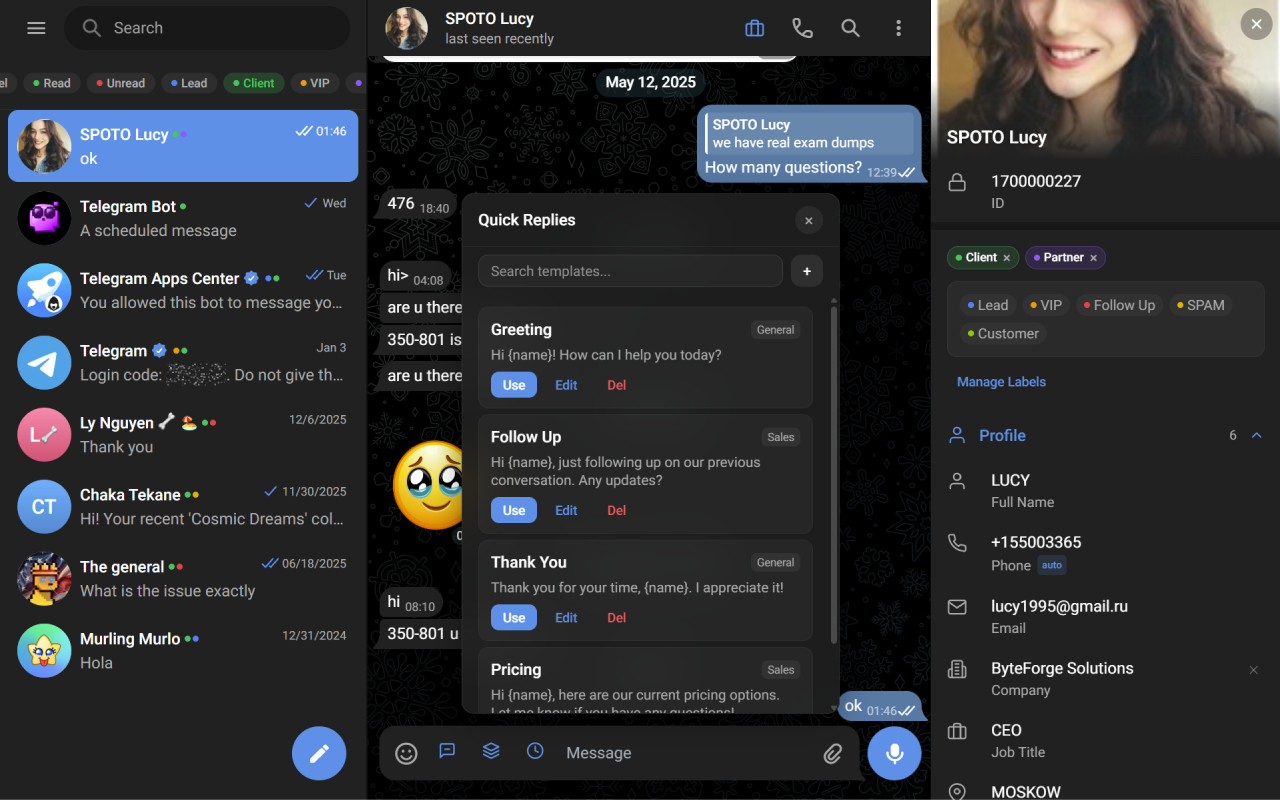
GramSales turns Telegram Web into a business workspace with a CRM built in.
Telegram's Core Business Features
Channels: Your Broadcast Platform
Telegram channels allow you to broadcast messages to an unlimited number of subscribers. Unlike groups, channels are one-directional -- you publish, subscribers read. This makes them ideal for announcements, product updates, content marketing, and promotional campaigns.
Channels support rich media including photos, videos, documents, and polls. Detailed view statistics show you exactly how many subscribers read each post, giving you better engagement data than most social media platforms provide organically.
Groups: Community and Collaboration
Telegram groups support up to 200,000 members, making them the largest group chat platform available. For business use, groups serve as customer communities, support forums, and team collaboration spaces.
Features like admin permissions, slow mode, pinned messages, and topic-based threads help you manage large communities effectively. You can create private groups for premium customers or public groups for general community building.
Bots: Automation and Integration
The Telegram Bot API is one of the platform's most powerful business tools. Bots can automate customer service, process orders, send notifications, collect feedback, and integrate with external systems.
Businesses use bots for everything from appointment scheduling to payment processing. Combined with webhooks and third-party services, Telegram bots can become the backbone of automated business workflows.
Telegram Business Accounts
Telegram Business is a relatively new feature set that adds professional capabilities to personal accounts. Business accounts can set business hours, display a business location, configure greeting messages for new contacts, set up away messages, and create quick reply shortcuts.
These features help businesses present a polished, professional image to customers who reach out via Telegram. If you are using Telegram for business purposes, switching to a Business account is a straightforward first step.
How Businesses Use Telegram: Key Use Cases
Sales and Lead Management
Telegram for business is exceptionally effective as a sales channel. The conversational nature of messaging creates a personal connection that email and web forms cannot replicate. Prospects ask questions, sellers respond in real time, and deals close faster because the communication is immediate and direct.
The challenge is managing these conversations at scale. When sales volume grows, businesses need a way to track leads, organize contacts, and maintain follow-up cadences. This is where CRM tools designed for Telegram become essential, and it is the core topic of our complete Telegram CRM guide. GramSales addresses this by embedding a full CRM sidebar inside Telegram Web, giving sales teams contact labels, deal pipelines, notes, reminders, and analytics without switching apps. If you are still validating the channel itself, our walkthrough on how to sell on Telegram covers the fundamentals first.
Customer Support
Many businesses use Telegram as a primary or supplementary support channel. Customers prefer messaging over email or phone because it is faster and less formal. Telegram's instant delivery, read receipts, and rich media support make it well-suited for resolving issues quickly.
For support teams, combining Telegram groups (for community-based support) with direct messages (for private issues) creates a comprehensive support system. Quick reply templates help agents respond consistently to common questions.
Marketing and Content Distribution
Telegram channels function as a marketing platform with guaranteed delivery. Every subscriber sees every message -- there is no algorithmic filtering deciding who sees your content.
Businesses use channels to share blog posts, product launches, industry news, exclusive offers, and educational content. The ability to schedule posts and track view counts makes it easy to build a consistent content strategy.
Some businesses create multiple channels for different purposes -- one for announcements, one for deals, and one for educational content -- to segment their audience and keep messaging relevant.
Community Building
Building a community around your brand creates loyal customers and organic word-of-mouth growth. Telegram groups are ideal for this because they support large-scale conversations with powerful moderation tools.
Successful business communities on Telegram share a few traits: active engagement from the business itself, clear rules and moderation, regular valuable content, and genuine interaction rather than constant selling. The community becomes a place where customers help each other, share feedback, and develop loyalty to your brand.
Telegram for Business vs. WhatsApp and Email
Telegram vs. WhatsApp Business
WhatsApp Business is the most common comparison point. Both platforms offer messaging-based business communication, but they differ significantly.
Telegram offers larger groups (200,000 vs. 1,024 members), unlimited channel subscribers, a more powerful bot platform, multi-device support without phone dependency, larger file sharing (up to 2GB), and no message template restrictions for business outreach. WhatsApp has the advantage of a larger global user base, particularly in certain markets.
For businesses that need to broadcast to large audiences, manage sizable communities, or build automated workflows, Telegram for business is the stronger platform. WhatsApp Business works better for businesses in regions where WhatsApp dominates and the focus is on small-scale one-on-one communication. For a deeper side-by-side breakdown, see our Telegram vs. WhatsApp Business comparison.
Telegram vs. Email
Email remains important for formal communication, but it generally suffers from lower open rates and slower response times than messaging. Mailchimp's industry email benchmarks put average open rates across many sectors in the low- to mid-20% range, while Telegram messages have near-instant delivery and tend to see significantly higher read rates.
Telegram is better suited for real-time sales conversations, quick customer support, and community engagement. Email is better for detailed documentation, legal communications, and reaching people who are not on Telegram. Smart businesses use both channels strategically.
Best Practices for Using Telegram for Business
Maintain a Professional Presence
Even though Telegram is a casual messaging platform, your business presence should be polished. Use a clear logo as your profile photo, write a descriptive bio with your value proposition, and set up a Telegram Business account with business hours and location.
Respond Quickly
Speed matters on messaging platforms. Customers who message you on Telegram expect faster responses than they would via email. Aim to respond within an hour during business hours. Quick reply templates and AI-powered smart replies -- features available in tools like GramSales -- help you maintain fast response times even when conversation volume is high.
Do Not Spam
The fastest way to lose subscribers and damage your reputation is to send too many messages. Quality over quantity applies doubly on Telegram, where users can easily mute or leave channels and groups. Establish a posting schedule and stick to it.
Segment Your Audience
Use separate channels or groups for different audience segments. VIP customers might get exclusive content and early access, while general subscribers receive regular updates. Contact labels and tags in your CRM help you track which segment each person belongs to. Our guide to Telegram contact management covers how to keep these segments organized as your list grows.
Track Your Performance
Without data, you are guessing. Use channel analytics to monitor subscriber growth and engagement. Use a CRM with dashboard analytics to track sales metrics like conversion rates, deal values, and follow-up completion. GramSales provides these analytics directly inside Telegram Web, so you can review performance without switching to another platform.
Leverage Automation Wisely
Bots and automated messages save time, but overusing them makes interactions feel impersonal. Use automation for routine tasks like greeting new members, answering FAQs, or sending order confirmations. Keep sales conversations and complex support issues human.
Enhancing Telegram for Business with CRM Tools
Native Telegram is powerful, but it was designed as a messaging platform, not a business management tool. As your business grows on Telegram, you will need additional infrastructure to stay organized.
A CRM built for Telegram fills the gaps. Contact management ensures you always know who you are talking to and their history with your business. Deal pipelines give you visibility into your sales process. Reminders and scheduled messages ensure timely follow-ups. Analytics help you understand what is working and what needs improvement.
GramSales was built specifically for businesses that operate on Telegram. As a Chrome extension that embeds inside Telegram Web, it adds contact labels, color tags, notes, reminders, a kanban deal pipeline, quick reply templates with variables, AI-powered smart replies and translation, dashboard analytics, CSV export, and scheduled messages -- all without leaving Telegram.
Whether you are a solo entrepreneur managing twenty conversations or a growing team handling hundreds, having CRM tools integrated into your Telegram workflow is the difference between organized growth and chaotic stagnation.
Getting Started with Telegram for Business
Starting with Telegram for business does not require a large investment or technical expertise. Here is a practical path forward.
- Set up a Telegram Business account with your company information, hours, and greeting message.
- Create a channel for broadcasting updates, content, and promotions to your audience.
- Create a group for community interaction and customer support.
- Install a CRM tool like GramSales to manage contacts and track deals from day one.
- Cross-promote your Telegram presence on your website and other social media platforms.
- Establish a content schedule for your channel and stick to it consistently.
The businesses that succeed on Telegram are the ones that treat it as a genuine business channel deserving of strategy, tools, and consistent effort. Start building your Telegram business presence today, and equip yourself with the right tools from the beginning.
Related Guides
Keep building your Telegram business stack with these related reads:
- The complete Telegram CRM guide — the pillar overview of how a CRM turns Telegram into a real sales system.
- Telegram CRM for agencies — multi-account, multi-client workflows for teams managing many conversations.
- Telegram CRM for crypto — how Web3, trading, and crypto communities run sales and support on Telegram.
Frequently Asked Questions
Is Telegram good for business?
Yes. Telegram is well suited for business because it combines a large global audience with unlimited-subscriber channels, groups of up to 200,000 members, a powerful bot platform, and free Business account features like greeting messages and quick replies. It is strongest as a direct sales, support, and community channel, especially when you pair it with a CRM to track contacts and follow-ups.
What is the difference between a Telegram Business account and a regular account?
A Telegram Business account adds professional features on top of a normal personal account, including business hours, a displayed location, automated greeting and away messages, and quick reply shortcuts. It does not change your username or chats; it simply makes your presence look more polished to customers who message you.
Do I need a CRM to use Telegram for business?
You can start without one, but a CRM becomes essential as conversation volume grows. Native Telegram has no built-in way to track deal stages, set follow-up reminders, or store notes on each contact. A tool like GramSales adds a CRM sidebar, labels, a kanban pipeline, reminders, and quick-reply templates directly inside Telegram Web, so nothing slips through the cracks. It is free to start, with no credit card required.
Get Started with GramSales
Ready to turn Telegram into an organized sales channel? Install GramSales from the Chrome Web Store to add a full CRM inside Telegram Web in minutes — it is free to start, no credit card required. Compare plans on the pricing page, or browse the GramSales blog for more strategies and tips.
About the author
Adam Rivera
Founder & Product Lead, GramSales
Adam has been shipping software since 2009 and leading product and engineering teams since 2012. Over nearly twelve years at GMR Marketing he went from Lead Application Developer to SVP of Digital Product & Experience Technology, where he shipped an omni-channel CRM and POS platform and stood up a data-science practice — building a stack that runs from React and .NET Core through Azure, Databricks and Python. He started GramSales to bring that same CRM thinking to where conversations actually happen: inside Telegram.
Connect on LinkedIn